
Student Scan Manager controls the Student Scan Application. The Student Scan Application is a separate application used to scan student IDs and log that information to the Q database. Some possible uses include recording student attendance at a sporting event, or scanning students arriving late to school.
The application has several options including:
- Printing a receipt/ticket
- Entering notes
- Keypad entry
- Manned or unmanned mode
- Use of execution hooks
This application, the Student Scan Manager is used to configure the way the Student Scan Application can be used through Purpose Types and Event Locations. Each session of the Student Scan Manager is based on an Event Location and a Purpose Type. The properties of an Event Location determine what users can select that location and what Purpose Types will be displayed for sessions initiated at that location. The properties of the Purpose Type determine what users can select that Purpose Type and the behavior of the Student Scan Application for that session.
NOTE: Configuration of procedure requires SQL coding (hooks). This portion of the setup must be completed by someone with database access.
Student Scan Manager is located under the System menu in Q.
System – Student Scan Manager [Application] Access to Student Scan Manager App and the Student Scan App.

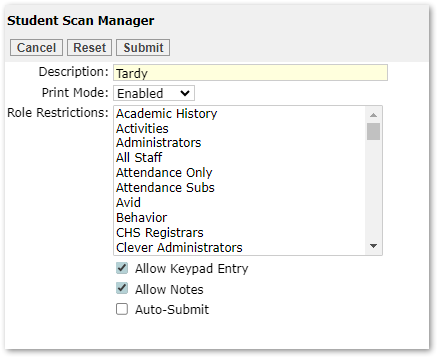
Purpose Types:
- Description: Enter name for Purpose
- Print Mode: Dropdown with Enable, Disable or Auto-Print
- Role Restrictions: Select the staff roles that should have access to Student Scan and Student Scan Manager.
- Allow Keypad Entry: Application defaults to scanner use. If checked student IDs may be manually entered.
- Allow Notes: Text field for notes to be added prior to submit
- Auto-Submit: After a specified amount of time the system will automatically submit and trigger the QLIP.
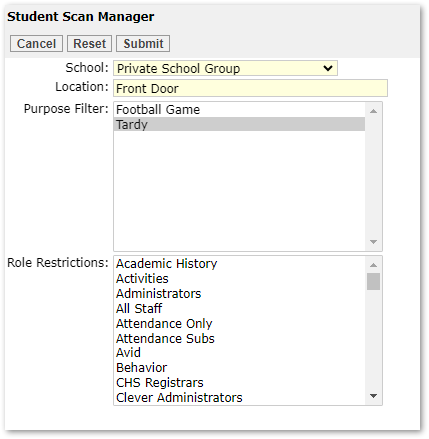
Event Locations:

- School: Dropdown list populated from school editor
- Location: Enter name for Location
- Purpose Filter: Dropdown list populated from purpose types
- Role Restrictions: Select the staff roles that should have access to Student Scan and Student Scan Manager.
QLIP Hook
There are two hook like procedures for Student Scan. These hooks are always called, but are not in the QLIP Hook Editor. QLIP setup will need to be completed by someone with database access. Procedures used for Student Scan are:
- qStudentScan_BeforeSaveStudentScan
- Block Student IDs from other schools
- Block Student IDs that are suspended or expelled
- qStudentScan_AfterSaveStudentScan
- Write attendance records based on bell schedule
- Create Behavior incident and set penalty date
- Send email to parent
- Set message to display on screen and print on slip
For more information on Student Scan process, see the Student Scan documentation.
