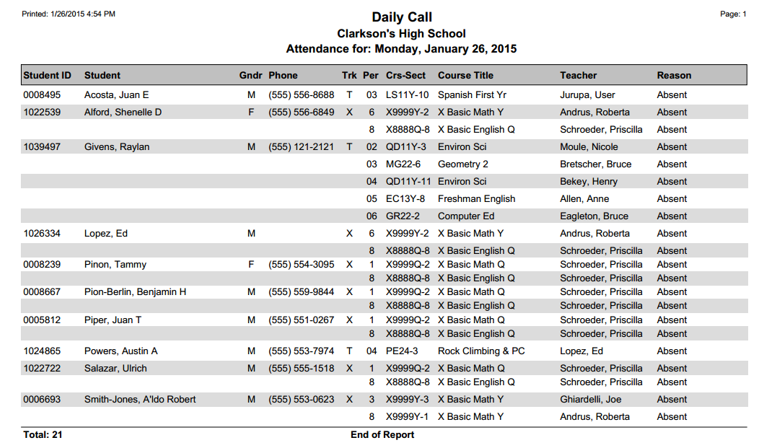
The Daily Call Report prints a list of selected Attendance codes posted for students on a specific day or for a date range. This report may be used as a tool for attendance clerks to audit the day’s attendance records in real time or review the attendance data of an entire day or range of dates.
While details specific to this report will follow, users can find general information about reports within the Reports documentation.
Daily Call Report is located within Reports in the Attendance menu in Q.
Report Options
The Daily Call Report offers the following options:
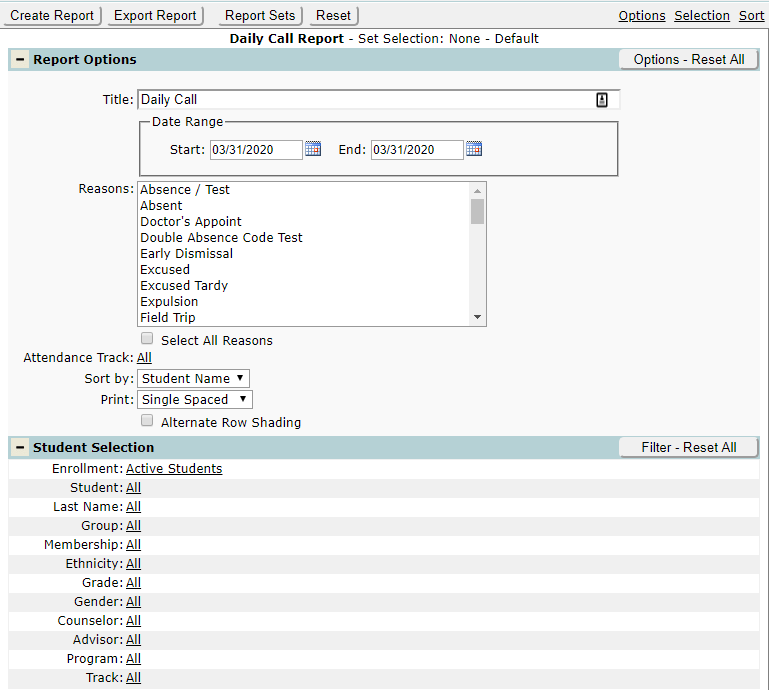
- Title – A user-defined title can be entered for the report.
- Date Range – Select the start and end dates for the report. To run the report for a single day, set the start and dates the same. When the date range is set for multiple days, the report groups the results by date.
- Reasons – Select the attendance reasons to be included in the report. Users can turn the ‘Select All Reasons’ check box on to run the report for all attendance reasons. Note: multiple attendance reasons can be selected by holding Control while clicking on multiple reasons.
- Attendance Track – Users may choose all trackers or specific tracks.
- Sort By – The report can be sorted by Student Name or by Teacher Name.
- Print – Print options include either Single Spaced or Double Spaced.
- Users can turn the Alternate Row Shading box on if desired.
Example Reports
Sample Daily Call report with alternate row shading turned ON