
The Q Collection Status Report provides school personnel with a list of course sections for which attendance either has or has not been entered on a particular date, providing a quick way to determine the current status of attendance taken for a given day. The report looks at the 'Attendance Taken' status of course sections as they are affected by data entry using Q Class Attendance or Class Entry in Front Office.
While details specific to this report will follow, users can find general information about reports within the Reports documentation.
Class Attendance Spreadsheet Report is located within Reports in the Attendance menu in Q.
The Collection Status Report offers the following options:
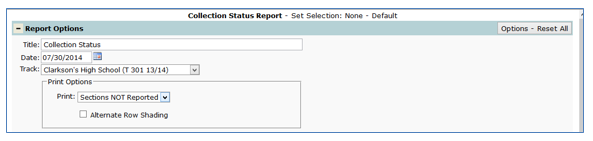
- Title – The default title upon launching the report is Collection Status, however it may be customized and allows for use of specialized characters
- Date – This report defaults to the current date and can only report data for one day at a time. Set the date for reporting in the Date field by typing in the date or using the calendar pop up box
- Print – Select to print 'Sections NOT reported' or 'Sections Reported'
- When 'Sections Reported' is selected, three additional options will be enabled:
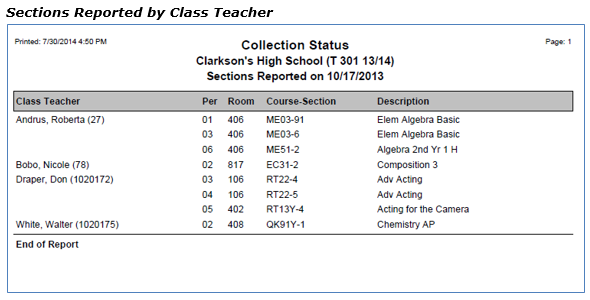
- Class Teacher – Select this option to report the teacher name scheduled to teach each course section
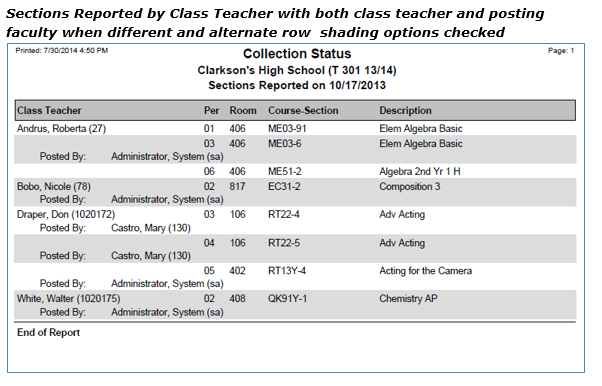
- Posting Faculty – Select this option to report only the user who actually posted the attendance for each course section (for example a substitute teacher, an assistant, a clerk, administrator, etc.)
- Print both class teacher and posting faculty when different – Select this option to print both the class teacher and the user who actually posted the attendance, if they are different
- When 'Sections Reported' is selected, three additional options will be enabled:
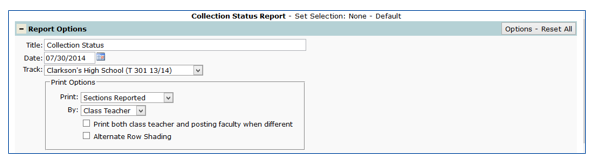
- Alternate Row Shading – turns on shading for every other row of student names
Sample Collection Status reports with different options selected:
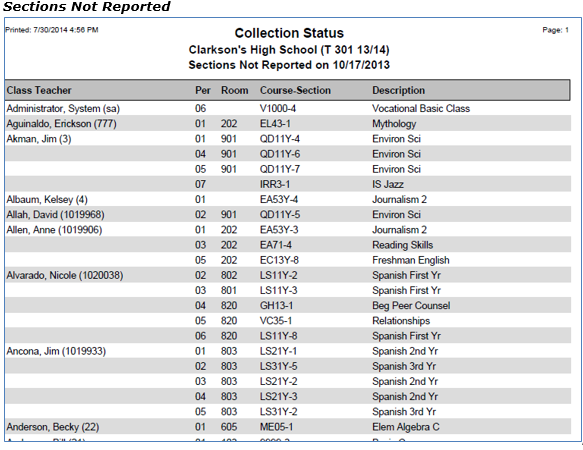
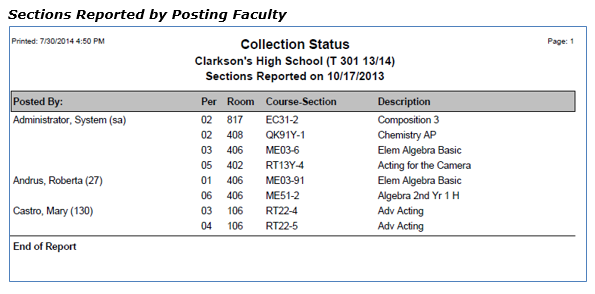
NOTE: Reports may look different depending on options, selections and sort order choices.
