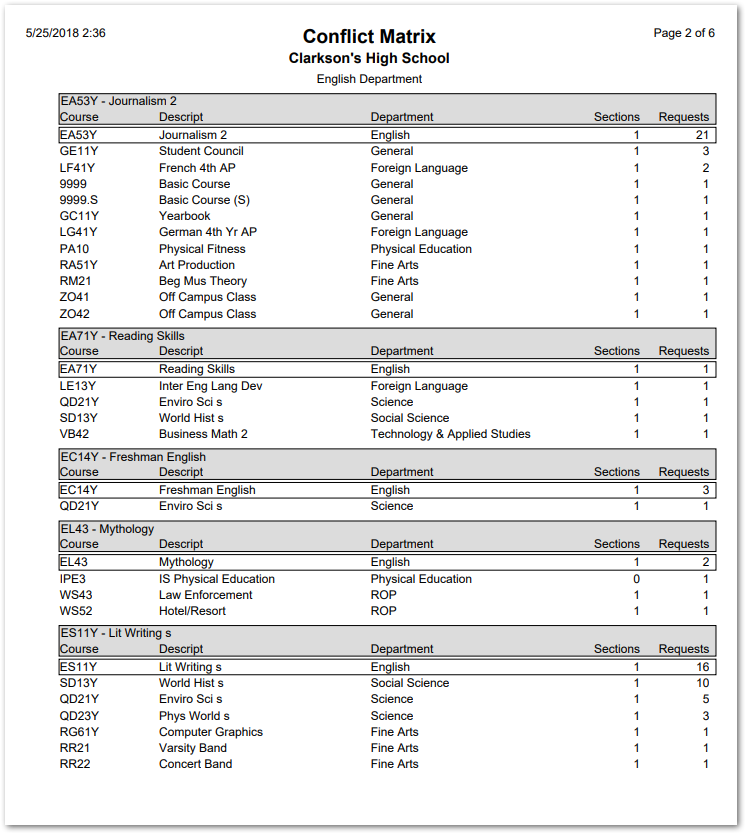
The Conflict Matrix report displays a list of potentially conflicting Course Requests.
While details specific to this report will follow, users can find general information about reports within the Reports documentation.
Conflict Matrix Report is located within Reports in the Schedule menu in Q.
Report Options
The Q Conflict Matrix report offers the following options:
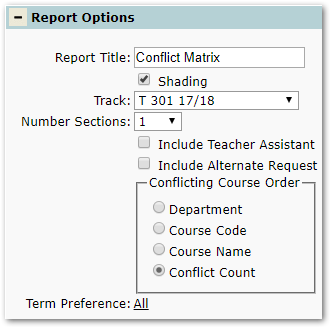
- Report Title—The default title of the report is Conflict Matrix but may be edited by the user
- Shading—Select to include shading on the report
- Track—Select a Track for the report
- Number of Sections—Select the number of sections
- Include Teacher Assistant—Select to include Teacher Assistants
- Include Alternate Request—Select to include Alternate Requests
- Conflicting Course Order—Select how you would like the conflicting courses ordered
- Term Preference—Select a Term Preference
Example Reports
Note: Reports may look different depending on options, selections, and sorting.
Sample Conflict Matrix report