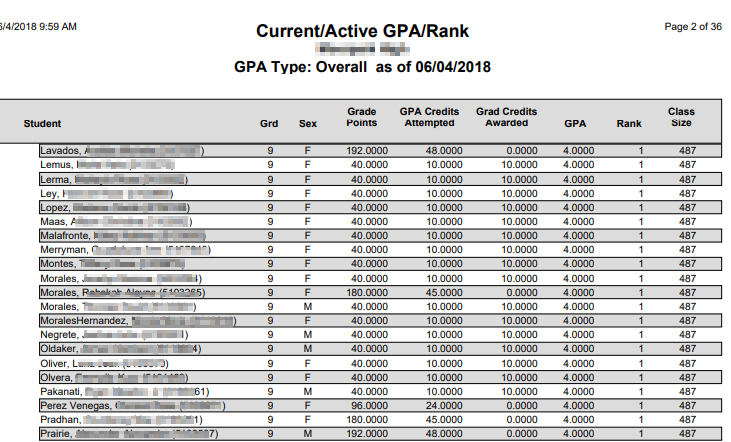
This report allows the user to view the student’s rank, (in regards to other students), based on their GPA’s.
While details specific to this report will follow, users can find general information about reports within the Reports documentation.
Current/Active GPA/ Rank Report is located within Reports in the Marks menu in Q.
Report Options
Report Options can be accessed by clicking the + sign next to Report Options, or by clicking the Options link on the right-hand side of the screen.
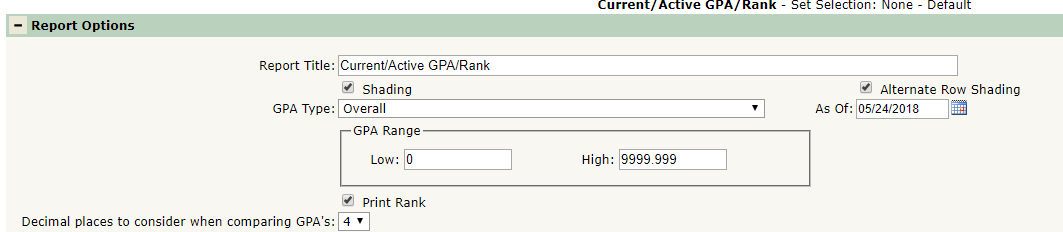
- Report Title – The default title may be edited.
- GPA Type – Select the GPA Type for which you wish to run the report. You may run the report for any of the GPA Types for which you have processed the Calculate GPA application. This Report accommodates a single GPA Type each time it is run.
- GPA Range – Select the range of calculated GPAs for which you wish to run the Report. This feature gives you greater precision in reporting on smaller groups of students.
- As Of – Select the target effective date for calculations.
- Print Rank – Deselect this option to omit the class rank data and print only the GPA data.
- Decimal Places to Consider When Comparing GPA’s – You may need to adjust this number to break ties in ranking.
Example Reports
Sample Current/Active GPA/Rank Report