
Class Attendance is a class banner application primarily used by teachers to enter attendance for their assigned classes. Teachers typically are only given access to data for the courses they are assigned to teach, for the logged-in track. Users with roles other than teachers may view all courses, depending on their permissions.
While details specific to this report will follow, users can find general information about reports within the Reports documentation.
Visits Report is located within Reports in the Enrollment menu in Q.
- The Visits Report can be run:
- For a defined date range.
- Click on the calendar icon to display a calendar to easily select dates.
- For All Visit Types or selected Visit Types.
- Print Notes.
- Print Shared Visits Only.
- For a defined date range.
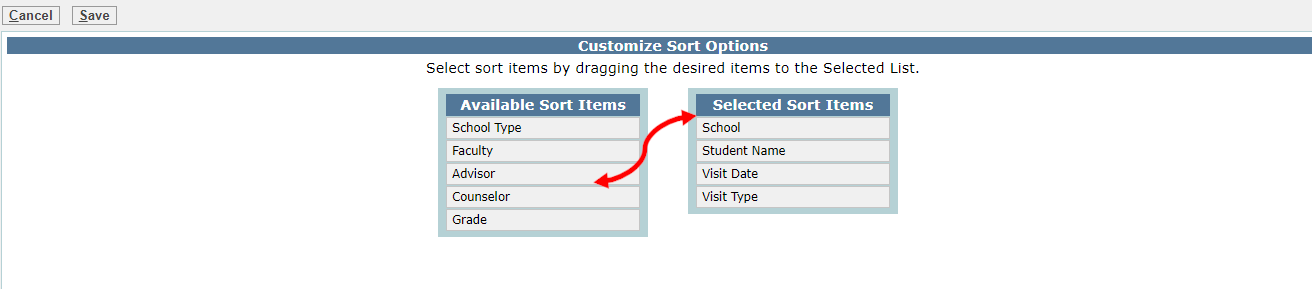
The Visits Report offers the user the ability to add additional sort options than those offered in the default report. To access additional sort choices:
- Click Change Sort Items to open a list of available choices.
- When the pop up screen opens, select the desired sort item from the list on the left and drag and drop in the list on the right.
- Once all desired items have been added to the Selected Sort Items column, the order may be changed by dragging up or down on the sort item name until the desired order is achieved.
- When all sort items have been added and placed in the desired order in the right hand list, click Save.
- Once saved, the additional items will appear in the Sort list.

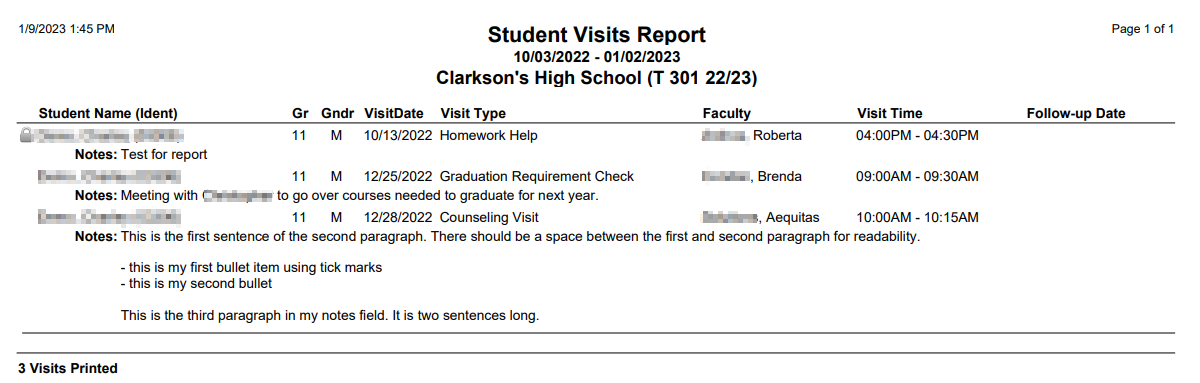
NOTE: Reports may look different depending on options, selections and sort order selected
