
The Class Marks Listing report lists the student marks for class(es) and given marking term.
While details specific to this report will follow, users can find general information about reports within the Reports documentation.
Class Marks Listing Report is located within Reports in the Marks menu in Q.
Report Options
The Report Options can be accessed by clicking the + sign next to Report Options, or by clicking the Options link on the right hand side of the screen. 
The Class Marks Listing report provides the following options:
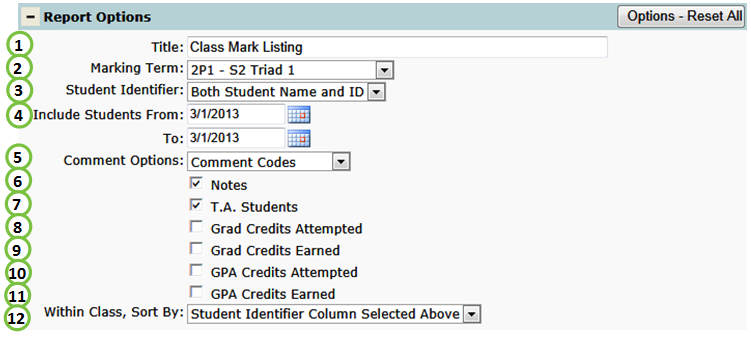
- Title – include a custom title or leave at its default title.
- Marking Term – select the desired term.
- Student Identifier – select how student(s) will be identified. By default, both the Student Name and ID# will be printed. For confidentiality purposes, students can alternatively be identified by ID or Row Number.
- Include Students Date Range – enter or select a date range to limit the roster of students.
- Comment Options – include and determine how comments are displayed on the report: by code or description.
- Notes – include notes that have been manually entered.
- T.A. Students – include teacher assistants on report.
- Grad Credits Attempted – graduation credits attempted for the selected class.
- Grad Credits Earned – graduation credits earned for the selected class.
- GPA Credits Attempted – grade percentage average credits attempted for the selected class.
- GPA Credits Earned – grade percentage average credits earned for the selected class.
- Within Class, Sort By – sort by either the Student Identifer, grade, or gender.
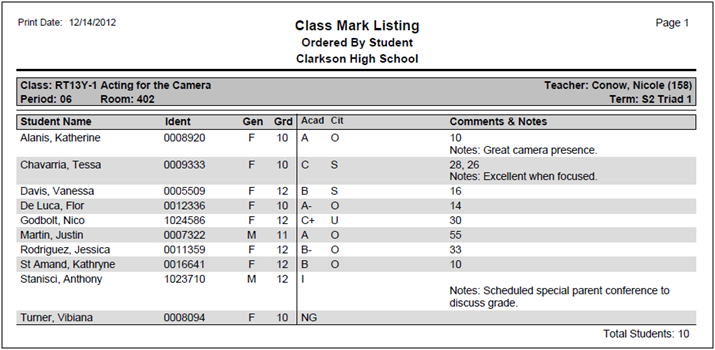
Example Reports
Videos
Q Academy Live
