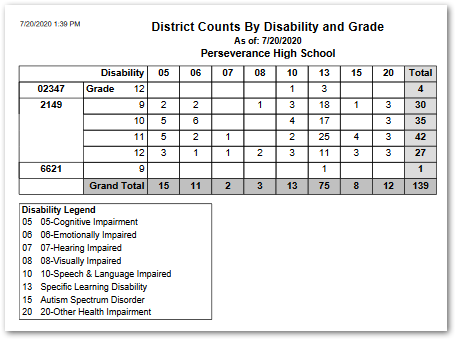
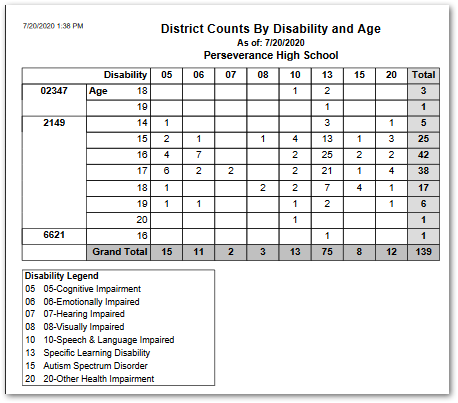
The Special Ed Disability Report produces a report of counts of students in two formats: ‘Disability by Age’ or ‘Disability by Grade’. The report shows schools by school code down the left and disability code across the top, with counts by either age or grade as selected.
While details specific to this report will follow, users can find general information about reports within the Reports documentation.
Special Ed Disability Report is located within Reports in the Programs menu in Q.
Report Options
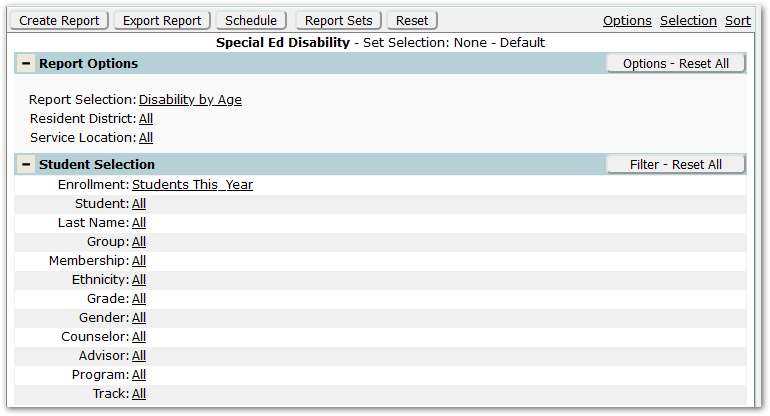
- Report Selection
- Disability by Age – Select this option to report number of students by disability by age.
- Disability by Grade– Select this option to report number of students by disability by grade.
- Resident District – Select the desired districts of residence.
- Service Location – Select the desired service locations.
Example Reports
The following example shows Disability by Age format:
The following example shows Disability by Grade format: