
The Missing Test Report generates a list of students who either have not taken, or have not passed a selected standardized test.
Missing Test Report is located within Reports in the Testing menu in Q.
Report Options
The Missing Test report offers the following options: 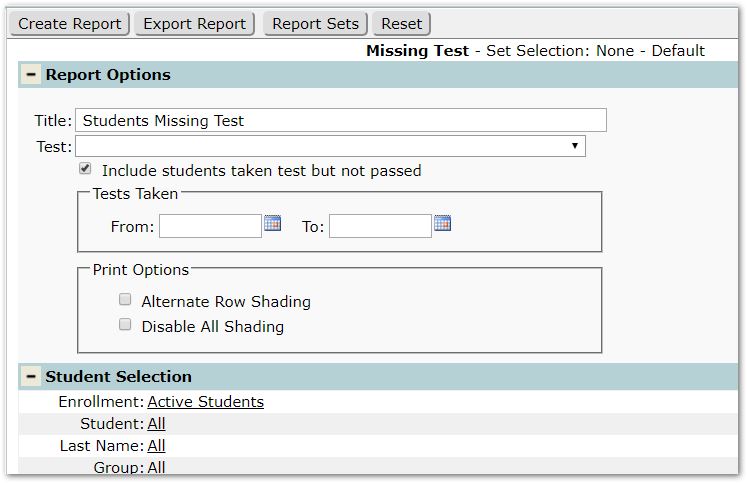
- Title – A default title is provided, but may be changed as desired.
- Test – Select specific test(s) or accept the default All tests to report.
- Include students taken test but not passed.
- Tests Taken – tests with dates within the date range specified will be included.
- Print Options
- Alternate Row Shading – Check if alternate row shading is desired.
- Disable All Shading – Check to remove all shading.
Example Reports
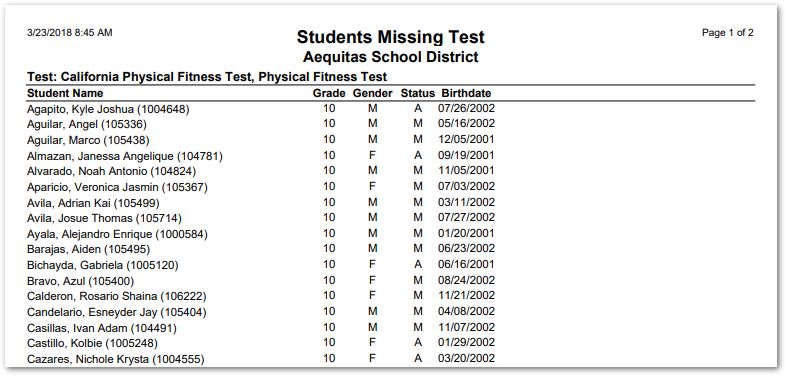
Sample Missing Test Report
