The Q Health Referrals Report produces a listing of Health Referrals for each student, pulling data that is stored in the Student Health application. This report allows for designating an effective data range and for filtering referral records by their Type, Reason, Status, and Referred By name.
While details specific to this report will follow, users can find general information about reports within the Reports documentation.
Health Referrals is located within Reports in the Health menu in Q.
Report Options
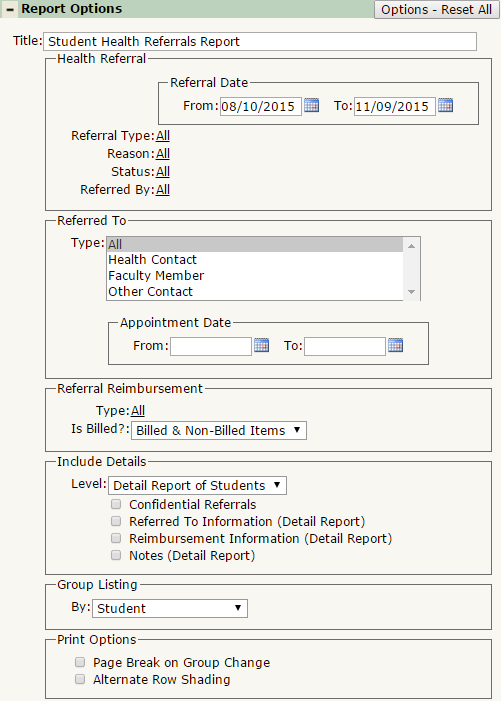
The Q Health Referrals Report offers the following report options:
- Title: Displays at the top of the printed report, rename here if necessary.
- Health Referral
- Referral Date: Defaults from the start of the track to today, select a date range to return data on.
- Referral Type, Reason, Status, and Referred By: All 4 of these selections default to ALL, but you may further filter the report by selecting specific items in any of their drop down lists.
- Referred To
- Type: Defaults to ALL, you may further filter the report by selecting an individual Referred To
- Appointment Date: Select a date range to restrict results based on the Appointment Date.
- Referral Reimbursement
- Type: Defaults to ALL, select the type of reimbursement to report from the drop down list.
- Is Billed?: Select whether to include Billed & Non-Billed Items, Billed Items Only, or Non-Billed Items Only.
- Include Details
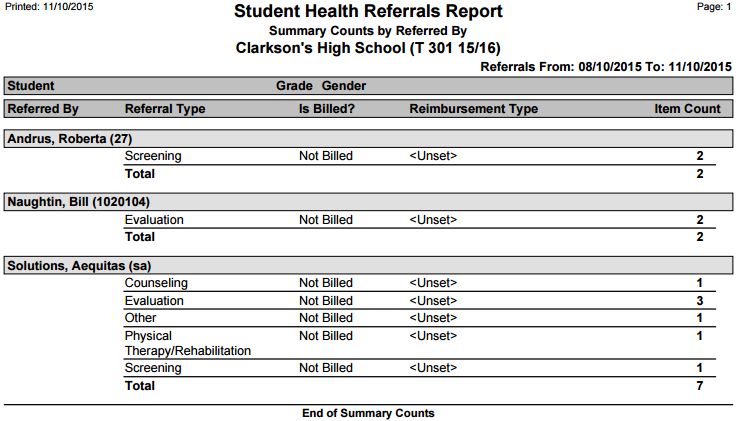
- Level: Select from Detail Report of Students, Summary Counts, or Both Detail & Summary. Certain information can only be included on the Detail Report, and is notated below. The Summary Counts level includes the Referred By staff member, with a count of their referrals, broken down by type.
- Confidential Records: Select this to include records that are marked as confidential.
- Referred To Information (Detail Report): Select to include the Referred To contact’s information, including their Address, Phone, Fax, and Email.
- Reimbursement Information (Detail Report): Select to include Reimbursement Information, which includes the reimbursement type and if it is billed.
- Notes (Detail Report): Select to include any notes associated with each Health Referral record.
- Group Listing By: Select to group the report by Student, Referral Type, Referral Status, Referred To, Referred By, or Reimbursement Type.
- Print Options
- Page Break on Group Change: Select this to jump to a new page when the group changes.
- Alternate Row Shading: Select this to print shading between consent records. This is useful when printing a large data set for an easier viewing experience
Example Reports
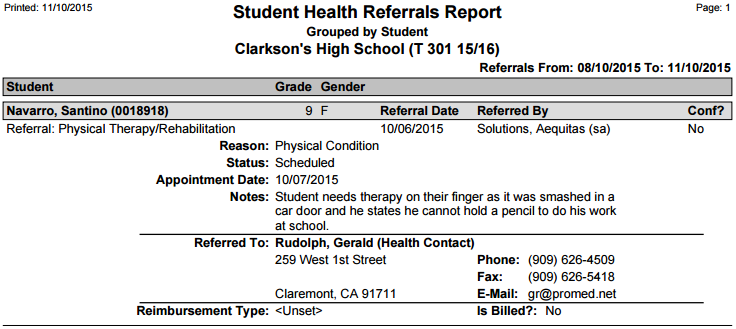
Report printed for one student, with Detail Report all sections from ‘Include Details’ on:
Report printed for Summary Counts: