
This report retrieves enrollment entry and exit data and presents it as a monthly enrollment gain/loss balance sheet for each track selected, for a defined date range. Attendance Months (as defined in the track's calendar) are used to group records within tracks. Total students gained or lost are shown on the bottom line.
While details specific to this report will follow, users can find general information about reports within the Reports documentation.
Gain/Loss is located within Reports in the Enrollment menu in Q.
When optional details are added, the report shows the name of each student who generated an entry or exit record, accompanied by relevant demographic data: date of record, entry/exit code, enrollment status, grade, ethnicity, gender, and homeroom.
A signature line for certification is included on the last page of the report.
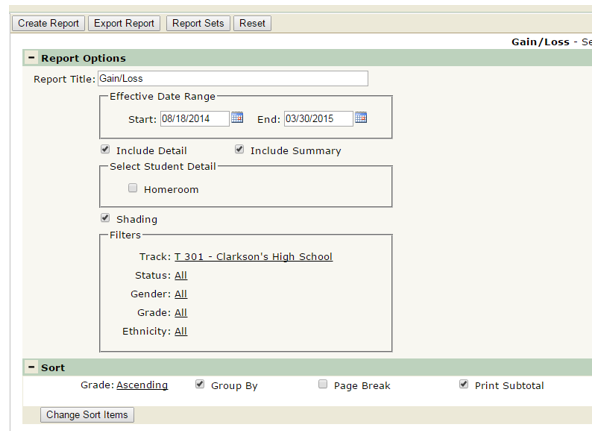
- Report Title: this can be changed to a user-defined report title.
- Effective Date Range: the default date range for reporting is the first day of the school year for the start date, and today’s date for the end date of the logged in track. This date range may be edited as needed.
- Include Detail: Include Detail will give details on the specific students that have been enrolled/exited in the specific time range, including their entry/exit date, and status, broken down by attendance month.
- Include Summary: Include Summary will just give a summary of the number of students that have been enrolled/exited for a specific time range without giving names of those students, and is broken down by attendance month.
- Select Student Detail: Turn the Homeroom option ON to include a column for the student’s homeroom on the report if applicable.
- Shading: turn this option on for alternate row shading.
- Filters: Users can filter by Track, Status, Gender, Grade, and/or Ethnicity.
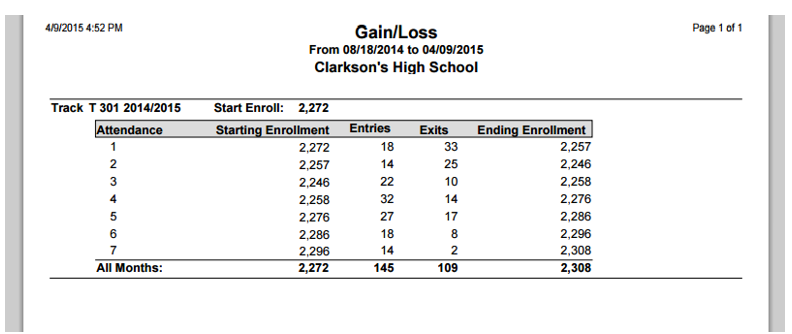
(Sample report with Include Summary option turned ON)
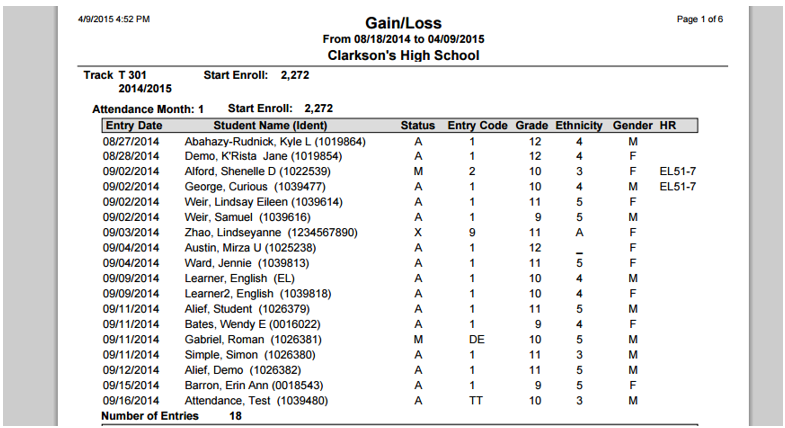
(Sample report with Include Detail and Homeroom options turned ON; *NOTE: if Include Summary and Include Detail were both ON, the report would include both samples here in the report.)
