
The Locker Assignments Report provides a list of all lockers assigned to a specific student.
While details specific to this report will follow, users can find general information about reports within the Reports documentation.
Locker Assignments is located within Reports in the Enrollment menu in Q.
Report Options
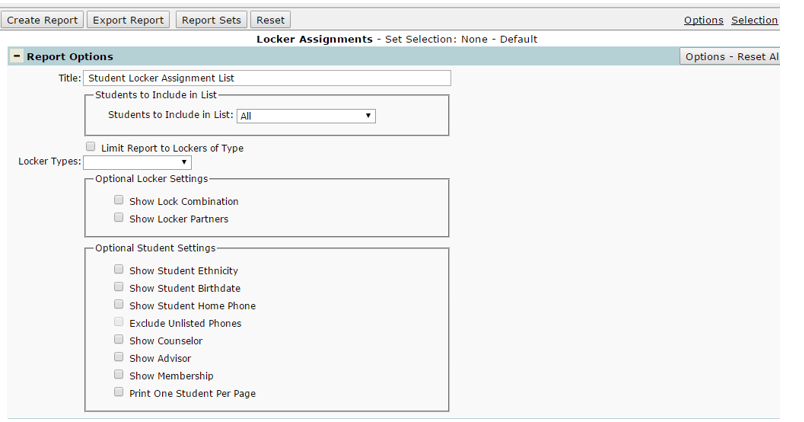
- Title: the report can be given a user-defined title.
- Students to Include in List: Users can designate the students to report based on their locker status: ‘All’ students, Students with Locker Assignments, or Students without Locker Assignments.
- Limit Report to Lockers of Type: the type of lockers reported can be limited to book lockers, gym lockers, instrument lockers, music lockers, student lockers, or virtual lockers.
- Optional Locker Settings: Users can select to show locker combinations and/or show locker partners.
- Optional Student Settings: here, basic student demographics can be included or excluded using these settings including ethnicity, birthdate, home phone, counselors, advisors, and/or memberships. Users can also select to print one student per page here. Unlisted phone numbers can be hidden here for confidentiality reasons as well.
Example Reports
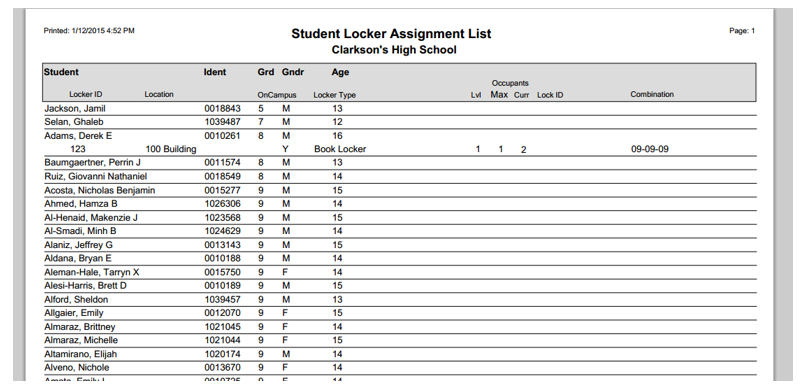
(Sample Locker Assignment Report)
