
The Grade Book Task Summary report prints students’ scores for a selected Task.
While details specific to this report will follow, users can find general information about reports within the Reports documentation.
Grade Book Task Summary is located within Reports in the Marks menu in Q.
Report Options
The Report Options can be accessed by clicking the + sign next to Report Options, or by clicking the Options link on the right-hand side of the screen.
The Grade Book Task Summary report provides the following options:
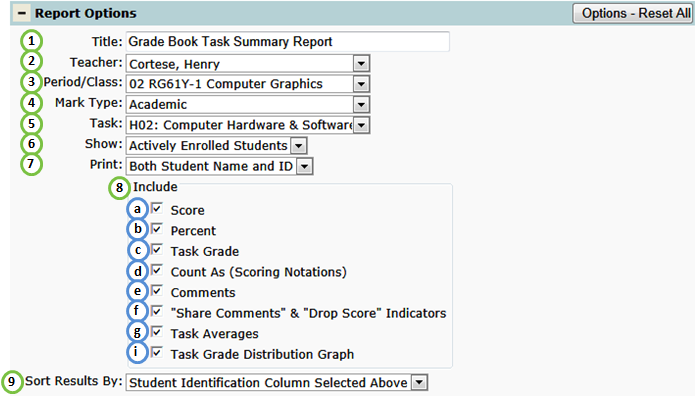
- Title - include a custom title or leave at its default title.
- Teacher - select a desired teacher. NOTE: Only teachers who have set up their grade book will be available.
- Period/Class - select a desired class. NOTE: Only classes who have at least one grade book assignment will be available.
- Mark Type - from the selected class, selet the desired Mark Type that will be summarized on the report.
- Task - select a desired Task (Assignment).
- Show - select All Students scheduled in class or Actively Enrolled Students.
- Print - select how student(s) will be identified. By default, both the Student Name and ID# will be printed. For confidentiality purposes, students can alternatively be identified by ID or Row Number.
- Includable fields for the selected Task:
- Score - student's score.
- Percent - student's percentage.
- Task Grade - student's grade received.
- Count As - scoring option applied (if applicable).
- Comments - student's comment entered by faculty.
- "Share comments" & "Drop Score" Indicators - display check flags for any task whose comments can be shared or has been dropped for a student.
- Task Averages - include class averages.
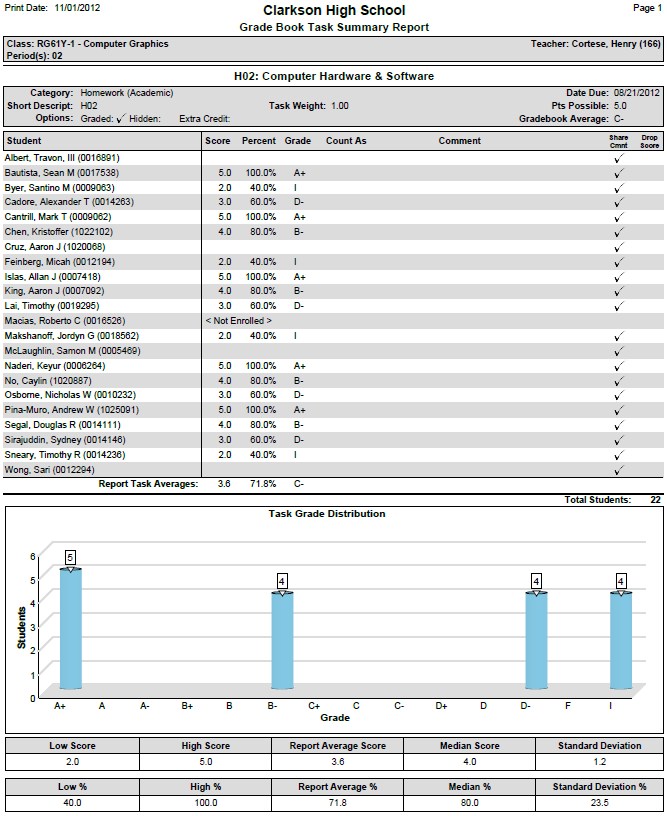
- Task Grade Distribution Graph - include a grade distribution bar chart and statistical results such as low & high scores, mean and standard deviation.
- Sort Results By - sort by either the Print option selected or by the student's task score ( by descending score).
Example Reports
Grade Book Task Summary Report
Videos
