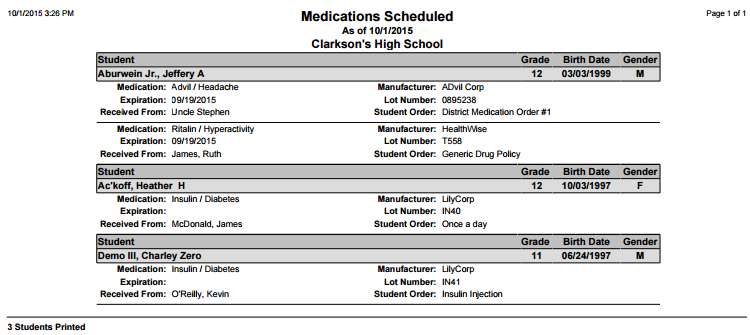
This report prints detailed information on each of the Scheduled Medications for a user defined set of students.
While details specific to this report will follow, users can find general information about reports within the Reports documentation.
Medications Scheduled Report is located within Reports in the Health menu in Q.
Report Options
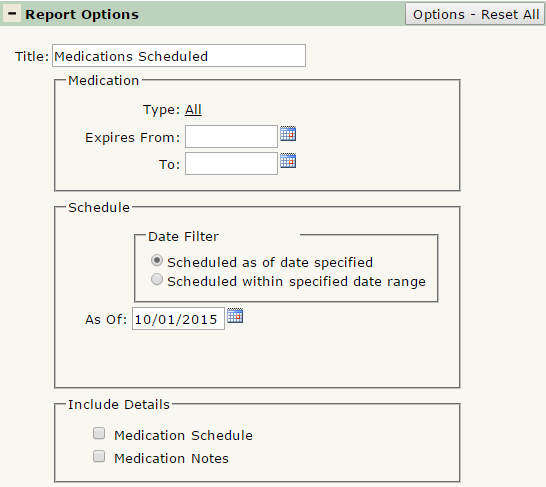
The Medications Scheduled Report offers the following report options:
- Title: Displays at the top of the printed report. Rename here if necessary.
- Medication
- Type: Defaulted to ALL, select the medication(s) to appear in the report. Ctrl-Click to select multiple medication types.
- Expires From/To: Defaulted blank, enter a date range to filter the report by when medications will expire.
- Schedule: Date Filter: Select either Scheduled as of data specified or Scheduled within specified date range. Either option opens a corresponding date field which you may edit to filter results.
- Include Details
- Medication Schedule: Check to include information on when the student is scheduled to receive their medication.
- Medication Notes: Check to include any notes attached to each Medication.
Example Reports
Report run with default options, with medications expiring up to 10/1/2015: