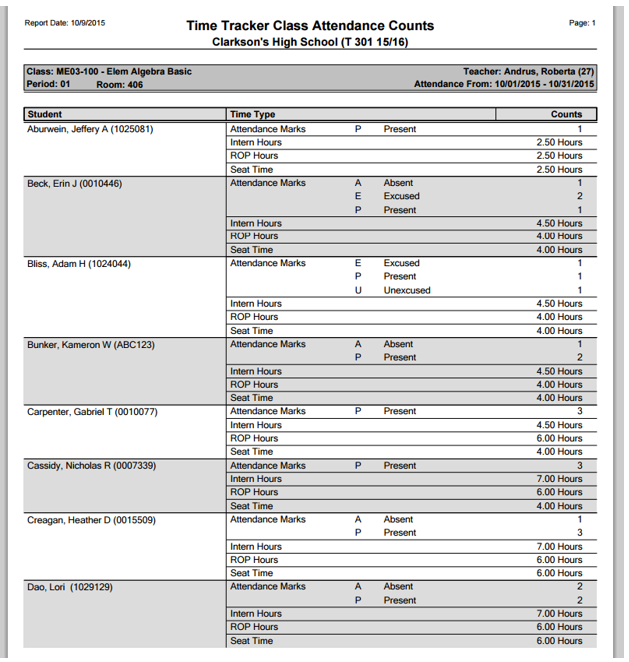
This Time Tracker Class Attendance Counts Report can be run with user defined date ranges and Time Types. The report prints a class listing with summary counts for each student. If the included Time Type is a code, the Count Column displays a tally of how many times each code was recorded for the student. If the Time Type is numeric, the Count Column displays the number of hours recorded per Time Type for the student. If there is no Time Tracker attendance data for the selected date range <No Attendance Data> will print next to the student’s name.
While details specific to this report will follow, users can find general information about reports within the Reports documentation.
Time Tracker Class Attendance Counts Report is located within Reports in the Attendance menu in Q.
The Time Tracker Class Attendance Counts Report offers the following options:
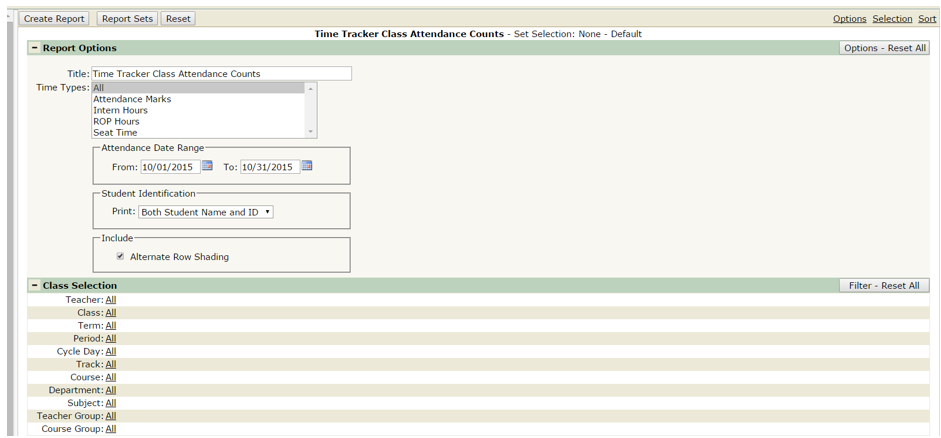
- Title – the report title defaults to Time Tracker Class Attendance Counts, but this can be edited, and a user defined title can be entered.
- Time Types – the selection defaults to ALL, however individual time types may be selected. Ctrl-Click to select multiple time types.
- Attendance Date Range – The default attendance date range is from the first to the last day of the current Dates may be changed by the user.
- Student Identification – users can select to print Both Student Name and ID or Student ID Only. This option defaults to Both Student Name and ID.
- Include – Alternate Row Shading is the default setting but may be turned off by removing the check.
Sample report with All Time Types selected.