
This report creates a customized checklist that is used to gather information on the general status of a student who is withdrawing from a school or the district, such as 'Reason for Leaving', 'New Address', 'Next School', latest marks in each class, current standing with the librarian, etc. The form has blank lines for manual entry and the student is typically asked to fill out the form and return it to the Registrar.
Note: The only scheduled sections that will appear on the report are those for which the ‘Assign Grades’ check box is checked ON in the Master Schedule Editor.
While details specific to this report will follow, users can find general information about reports within the Reports documentation.
Withdrawal Checklist Report is located within Reports in the Enrollment menu in Q.
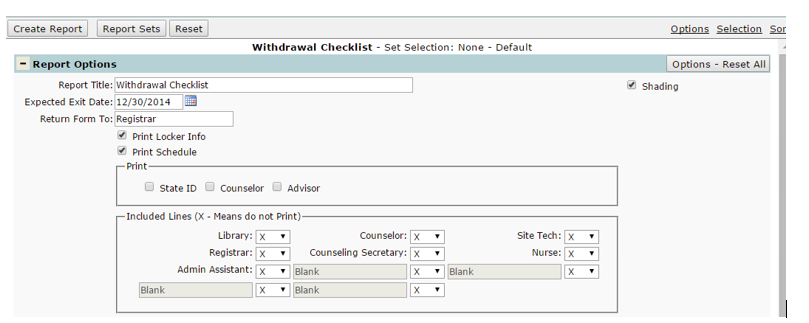
- Report Title – Default title can be edited.
- Expected Exit Date – when will the student withdraw from the school? The end date entered here will be printed in the form header.
- Return Form To: - who should get this form when completed? The default is ‘Registrar’, but this can be edited. The name entered here will appear across the bottom of the form in the format: “Please Return Completed Form to Registrar.”
- Print Locker Info – select this to print the student’s locker information on the report.
- Print Schedule – select this to print the student’s schedule on the report.
- Print State ID – select this to print the student’s state ID number in the header of the form, if applicable.
- Print Counselor/Advisor – select either to print the student’s counselor or advisor in the header of the form. Both can be selected at the same time.
- Include Lines – the user can define which additional staff will need to sign the checklist; ex: librarian, counselor, etc. Users can also print blank lines for the user to define manually.
