
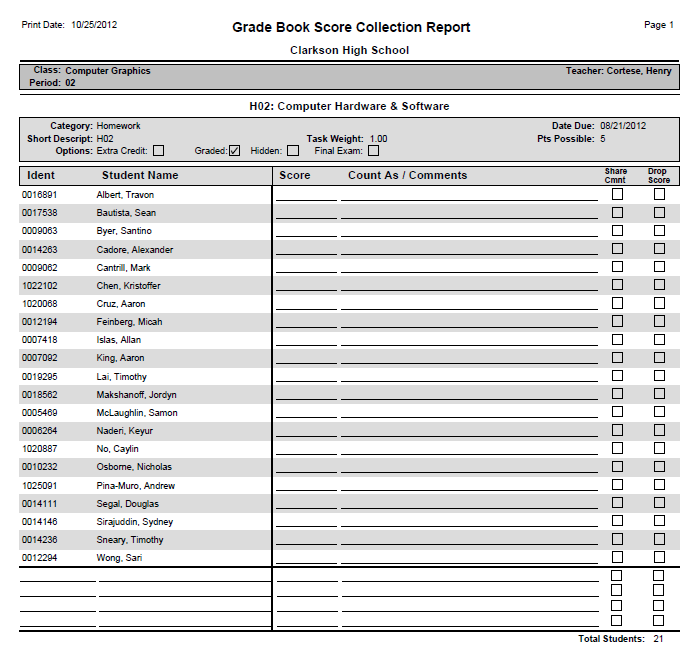
The Grade Book Score Collection report produces a form for manually collecting and recording scores when computer access is not available. A roster of students for the selected class is provided, with blank spaces for entering scores.
Report Options
The Grade Book Score Collection report provides the following options: 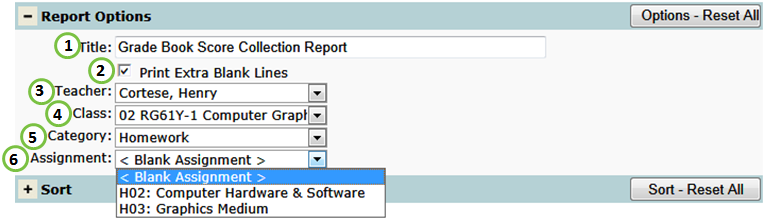
- Title - include a custom title or leave at its default title.
- Print Extra Blank Lines - include for blank lines for new students.
- Teacher - select a desired teacher.
- NOTE: Only teachers who have set up their grade book will be available.
- Class - select a desired class.
- NOTE: Only classes who have at least one grade book assignment will be available.
- Category - select a particular grade book category to filter the report by.
- Assignment - create a Blank Assignment form used to collect scores for any assignment or select a specific assignment. If selected, the form will include Category, Date Due, Short Description, Task Weight, Points Possible and Assignment Options: Extra Credit, Graded, Hidden, or Final Exam.
Example Reports
Videos
