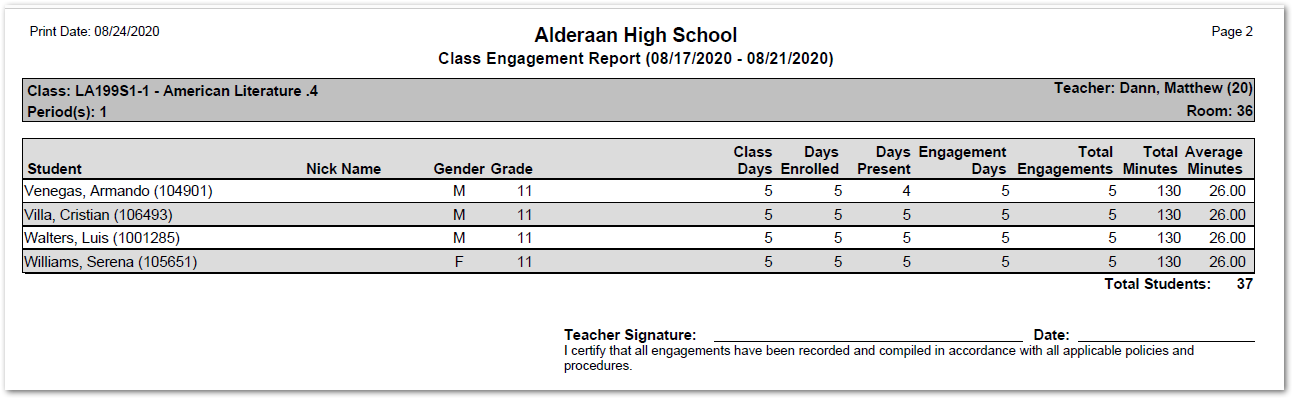
The Class Engagement Report produces a class roster report listing total teacher engagements with their students as entered through the Class Engagement application. Totals are provided for class days, days enrolled, days present, engagement days, total engagements, total minutes, and average minutes within a specific date range.
The report prints teacher class rosters for all classes in the track master schedule by default but may be configured by the user to exclude classes with no engagement records. Engagement details, notes and a teacher signature line may also be printed.
A system Preference is available for the Class Engagement application allowing the entry of the number of minutes for each Engagement. When set to ‘Yes’, the number of minutes entered will also print on the report.
Class Engagement Report is located within Reports in the Enrollment menu in Q.
The Class Engagement Report offers the following options: 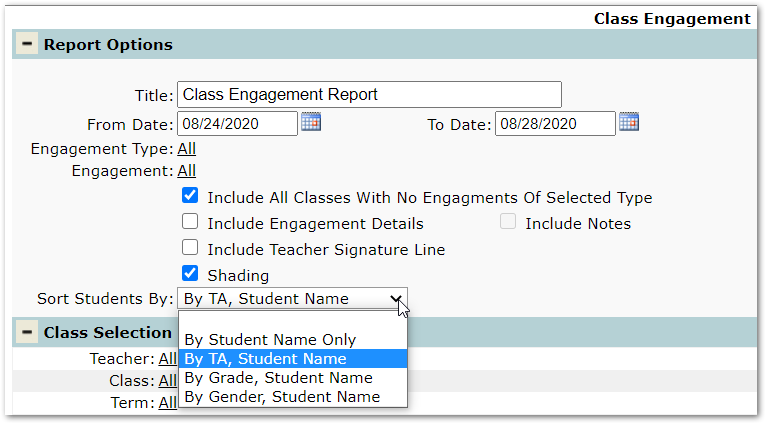
- Title – The report name appears as the default title, but this may be changed.
- From Date, To Date – The dates default to the current week begin and end dates but may be changed.
- Engagement Types – ‘All’ are selected by default, but specific Engagement Types may be selected.
- Engagement – ‘All’ are selected by default, but specific Engagements may be selected, keep in mind Engagements are tied to Engagement Types. If a specific Engagement Type is selected, only those Engagements associated with the selected type will display in the drop-down list.
- Include All Classes With No Engagements of Selected Type – When this box is checked all courses assigned to teachers in the master schedule will print, including those with no engagement records.
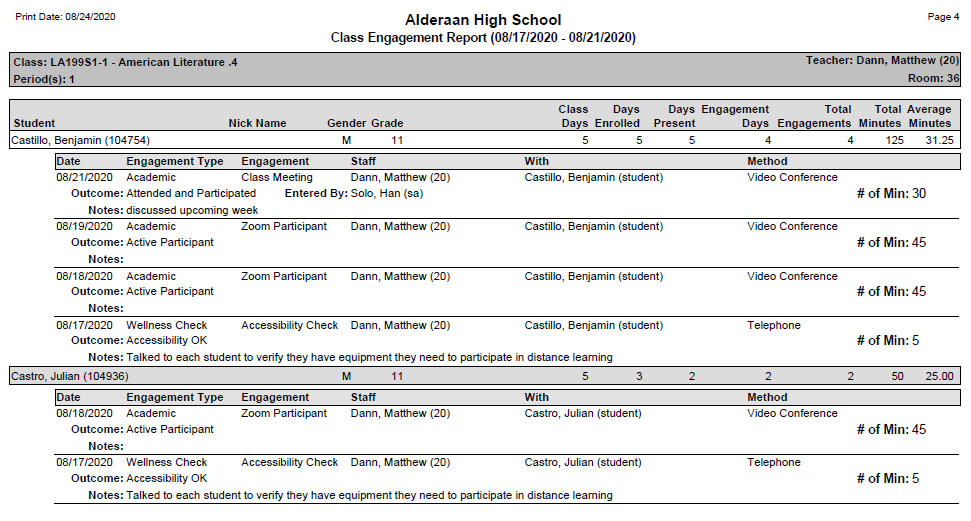
- Include Engagement Details – Check this option to print Engagement details which include the Engagement type, staff, method, outcome, and number of minutes for each engagement entered using Class Engagement.
- Include Notes – Check this option to print any notes entered for Engagements on the report.
- Include Teacher Signature Line – Check to print the Teacher signature line at the bottom of the report.
- Alternate Row Shading – Check to add shading on the report.
- Sort Students By – Select desired sort order for students listed on report.
Report Legend

- Class Days – Number of days the class met during the report date range. If the class is scheduled to meet every day and the report date range is for a 5 day week the Class Days will show 5. If the class meets fewer than 5 times a week due to cycle days and/or bell schedules the Class Days will reflect the number of times the class meets during the week.
- Days Enrolled – This number reflects the number of days a student was scheduled in the class. If a student has a schedule change at any time during the date range the days the student was scheduled in the class, will differ from the Class Days number.
- Days Present – Number of days a student was marked present and enrolled in the class during the report date range.
- Engagement days – The number of days during the date range that a class engagement record is entered for the student.
- Total Engagements – Total number of engagements entered in Class Engagement for the student. This number may vary from the Class Days if multiple engagements were recorded on any day.
- Total minutes – If the preference to track minutes is turned on and the teacher enters the number of minutes for the engagement, the total number of minutes entered for the student in Class Engagement during the report date range is listed.
- Average Minutes – The average number of minutes is calculated by taking the total number of minutes divided by total engagements during report date range.
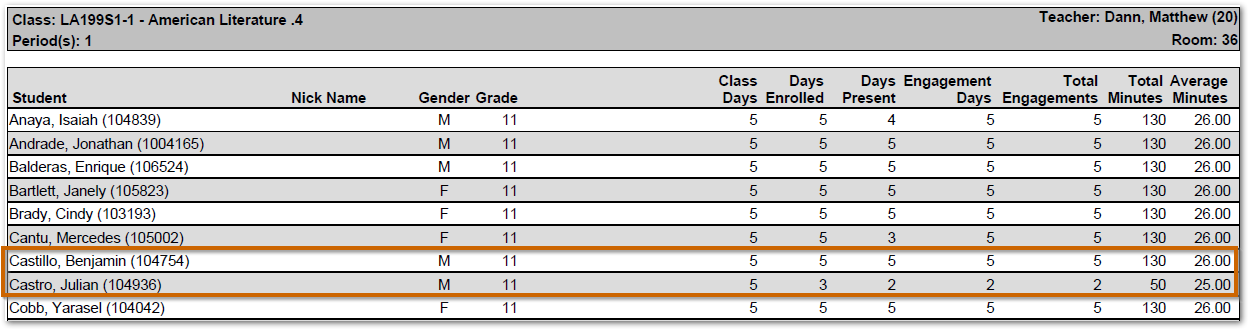
In the report sample below the American Literature Class met each day of a 5-day week. Benjamin Castillo was enrolled in the class all 5 days with no absences. Julian Castro had a schedule change, dropping the class after Wednesday’s class. He was also absent one day which explains the difference in the two student’s totals.
Report Sample including Engagement Details, notes and number of minutes entered
Report Sample with Engagement totals and teacher signature line