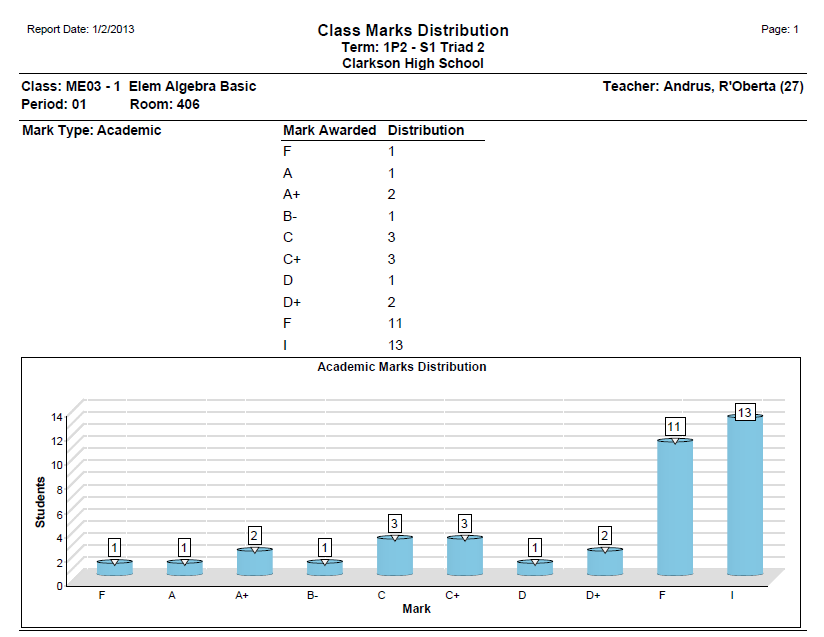
The Class Marks Distribution report displays counts of selected mark awarded for selected mark types and course(s), providing an at-a-glance view for analysis.
While details specific to this report will follow, users can find general information about reports within the Reports documentation.
Behavior Analysis Report is located within Reports in the Marks menu in Q.
The Report Options can be acessed by clicking the + sign next to Report Options, or by clicking the Options link on the right-hand side of the screen.

The Class Marks Distribution report provides the following options:
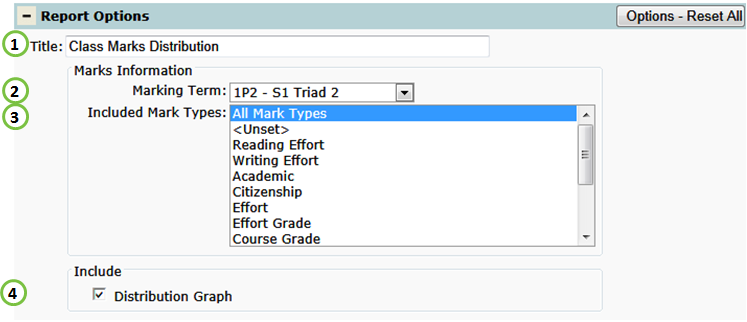
1. Title - include a custom title or leave at its default title.
2. Marking Term - select the desired term.
3. Include Mark Types - select Mark Types to be counted on report.
4. Distribution Graph - include a graphical chart of the mark counts.
Class Marks Distribution Report