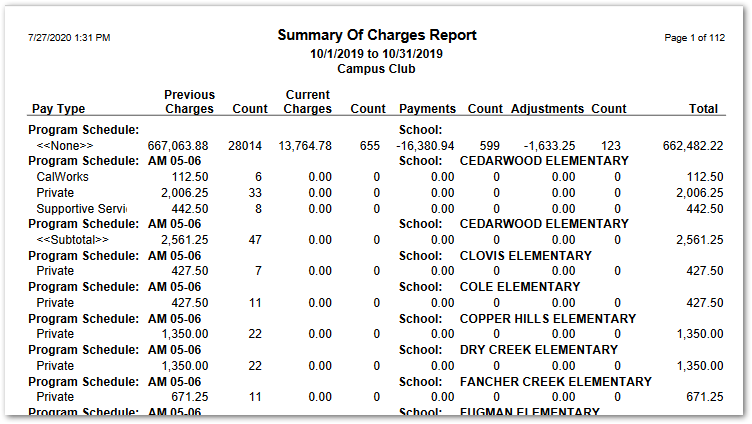
The EC Summary of Charges Report summarizes transactions by Program for a defined date range by Pay Type. Items are grouped by Program Schedule and Pay Type, showing previous charges, current charges, payments and adjustments, with a count of each.
While details specific to this report will follow, users can find general information about reports within the Reports documentation.
EC Summary of Charges is located within Reports in the School menu in Q.
Report Options
EC Summary of Charges Report Options enable the user to select:
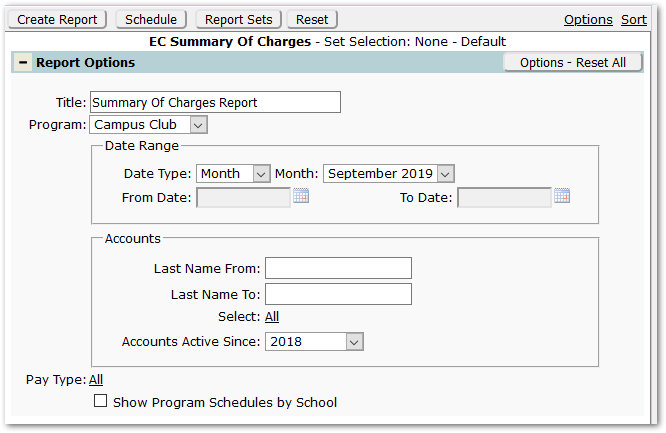
- Title – The default title ‘Summary of Charges Report’ will appear, but it may be edited and revised.
- Program – A program must be selected.
- Date Range
- Select Date Type of ‘Month’, shown above, or ‘Custom’, shown below. Correspondingly, select specific month or date range.
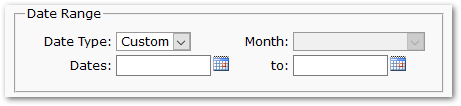
- Select Date Type of ‘Month’, shown above, or ‘Custom’, shown below. Correspondingly, select specific month or date range.
- Accounts – Select accounts, if desired, by either entering values for a range of last names or selecting specific accounts by clicking Select: ‘All’ and searching for and selecting specific accounts. Click Done when all desired accounts are selected.
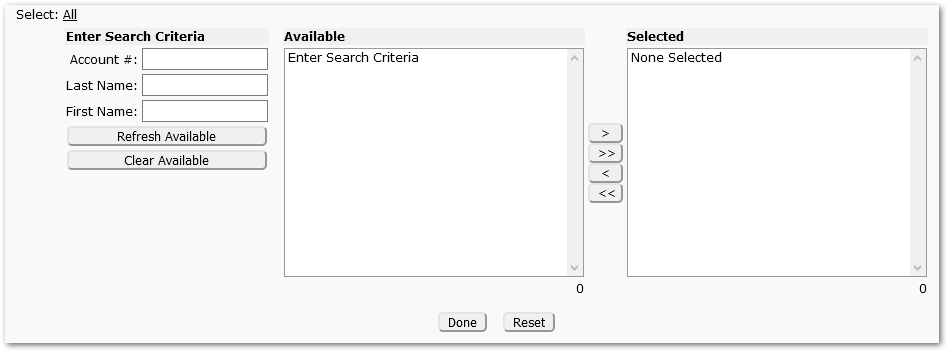
- Pay Type – This will default to ‘All’, but specific pay types may be selected.
- Show Program Schedules by School – Will default to unchecked. Check to include in the report.
Example Reports
The sample below shows EC Summary of Charges Report, with Program Schedules: