
The Document Loader application is used to mass load student documents from a zip file.
Document Loader is located under the System menu in Q.
Loading Documents
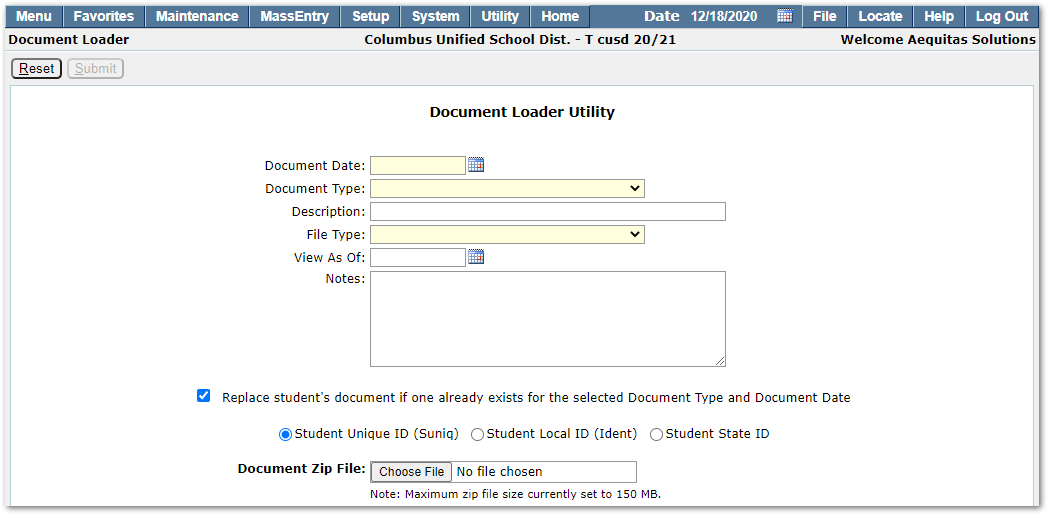 Document Date – Click the calendar or type in the Document Date.
Document Type – Select the appropriate Document Type from the drop-down.
Description – Enter a description to apply to the documents.
File Type – Select the appropriate File Type from the drop-down.
View As Of – Enter the View As Of date for the documents.
Notes – Enter any document Notes.
Student Unique ID (Suniq), Student Local ID (Ident) , Student State ID – Select whether the documents in the zip file are titled with suniq, ident, or SSID
Document Zip File – Click Choose File to select a zip file to upload.
After entering all required fields press the Submit button to load the documents. Once complete, the screen will refresh to display the Document Loader Results:
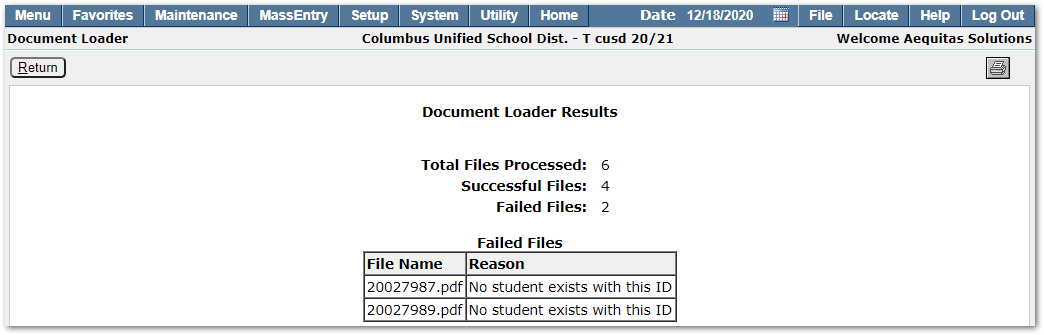 Total Files Processed – Total number of files in the zip file.
Successful Files – Number of files successfully uploaded.
Failed Files – The number of files that failed to load as well as the reason for each failure.
