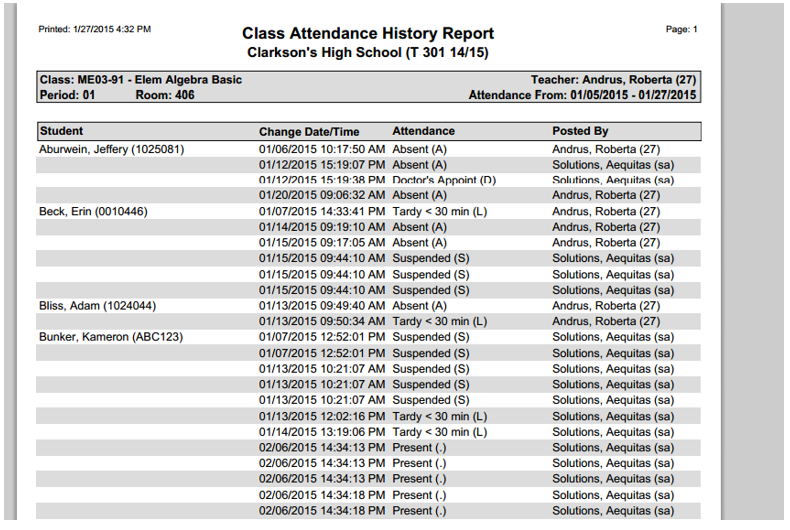
The Class Attendance History Report is a daily auditing tool that provides a listing by class of changes that have been made to attendance records.
While details specific to this report will follow, users can find general information about reports within the Reports documentation.
Class Attendance History Report is located within Reports in the Attendance menu in Q.
Report Options
The basic Class Attendance History report includes a Change Date/Time column, an Attendance column, and a Posted By column. If a change to a student's attendance has occurred, the original attendance record is followed by the replacement record.
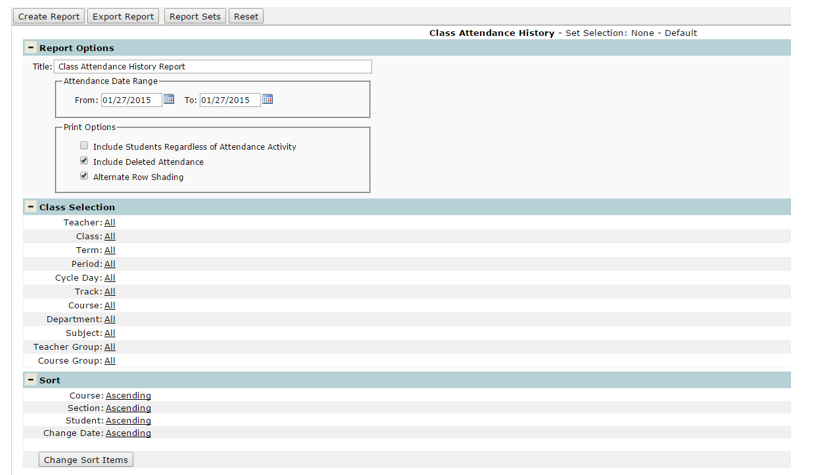
- Title – the report title defaults to Class Attendance History Report but this can be edited, and a user defined title can be entered.
- Attendance Date Range – the report will include attendance records based upon this date range.
- Print Options
- Include Students Regardless of Attendance Activity – If selected, the report will include all students in a class. Do not select to include only those students having attendance activity.
- Include Deleted Attendance – If selected, the report will include deleted attendance records.
- Alternate Row Shading – this option is defaulted on, but can be turned off if a user does not want to include alternate row shading on the report.
Example Reports
Sample Class Attendance History Report