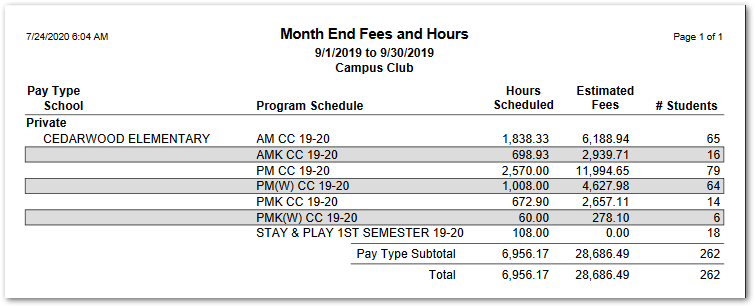
The EC Month End Fees report itemizes total fees payable at the end of the selected month or defined date range, for the selected Program and school. Records are group by Pay Type and itemized by Program Schedule. The number of hours scheduled, and the number of students enrolled in each Program Schedule is shown for reference.
While details specific to this report will follow, users can find general information about reports within the Reports documentation.
EC Month End Fees is located within Reports in the School menu in Q.
Report Options
EC Month End Fees Report Options enable the user to select:
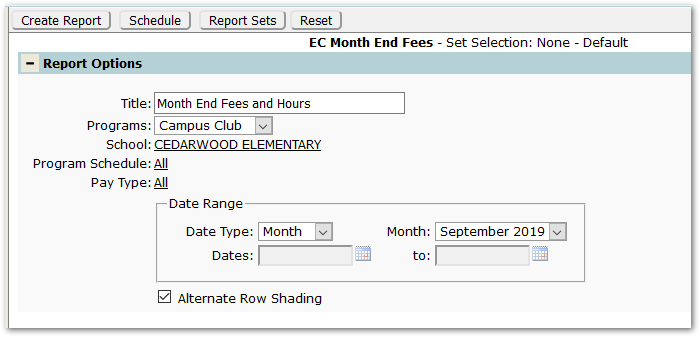
- Title – The default title ‘Month End Fees and Hours’ will appear, but it may be edited and revised.
- Program – A program must be selected.
- School – School will default to ‘All’, but a specific school may be chosen, as shown.
- Program Schedules – Select Program(s) to report, if desired, or accept the default ‘All’.
- Pay Type – Select specific pay types or leave to default to ‘All’ pay types.
- Date Range
- Select Date Type of ‘Month’, shown above, or ‘Custom’, shown below. Correspondingly, select specific month or date range.
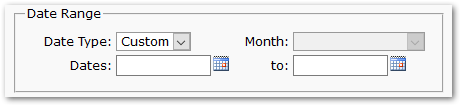
- Select Date Type of ‘Month’, shown above, or ‘Custom’, shown below. Correspondingly, select specific month or date range.
- Alternate Row Shading – Check to enable shading on alternate rows.
Example Reports
Reports may look different depending on the options chosen.
The sample below shows Month End Fees for one school, for one month, with alternate row shading: