
The EC Daily Enrl Summary produces an Excel Pivot table designed for analyzing and reporting EC enrollment data for the selected Program and defined Date Range.
While details specific to this report will follow, users can find general information about reports within the Reports documentation.
EC Daily Enrollment Summary is located within Reports in the School menu in Q.
EC Daily Enrl Summary’s Report Options enable the user to select: 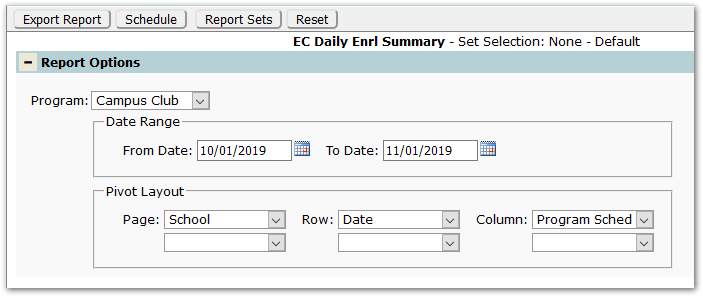
- Program – A program must be selected.
- Date Range –Will default to spanning a month, with the From Date defaulting to the system date or Today. Adjust the dates as needed.
- Pivot Layout – The pivot layout defines the fields used for the Page filter at the top of the pivot table, as well as the Row and Column. The defaults are shown. Adjust as needed. These may also be adjusted once the report is generated using the PivotTable Fields tool. See QWiki – Q Training Resources – Teacher Training – Reporting: Using Pivot Tables.
Reports may look different depending on the options chosen.
The sample below shows daily enrollment counts for the Campus Club program at the logged in school by date (down the left) and program schedule (across the top).
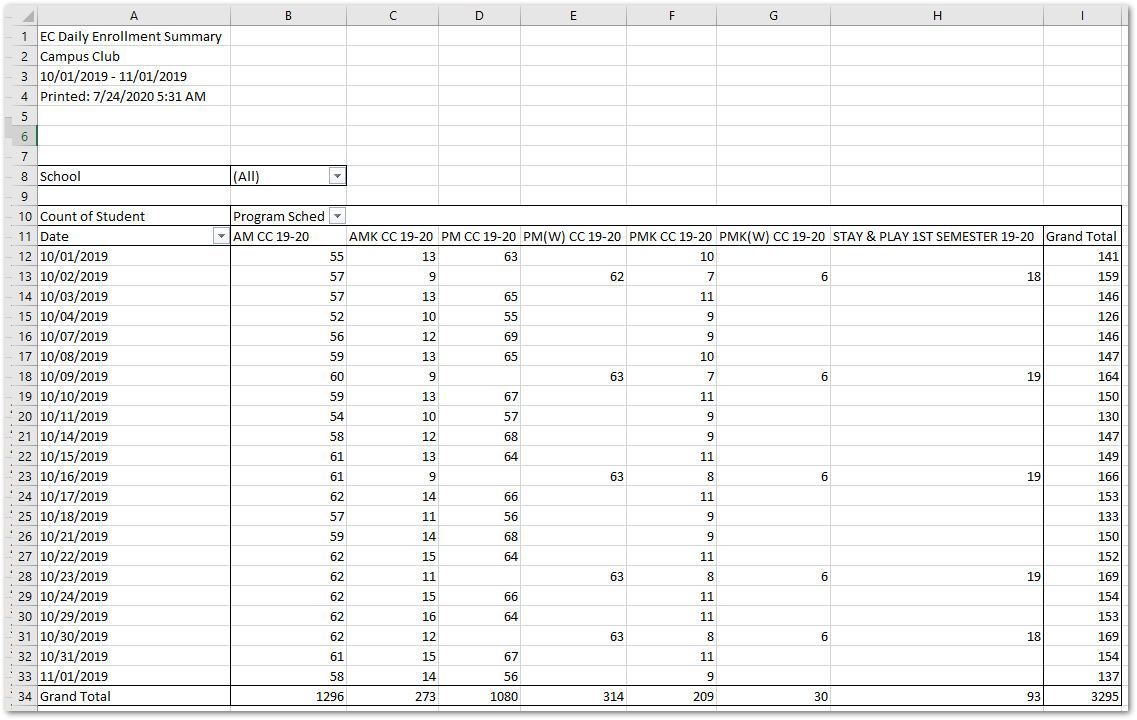
Clicking on a total will ‘drill down’, opening a new sheet with the student detail making up the selected total, as shown:

