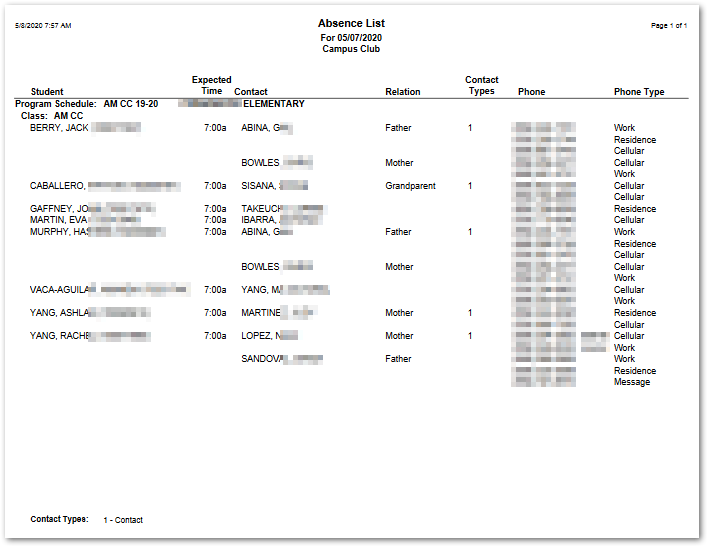
Designed as a call list to check on students who do not appear for class, this report produces the list of absent students for the selected EC Program on a selected Date with their expected arrival time. Contact information for students is provided for calling purposes.
While details specific to this report will follow, users can find general information about reports within the Reports documentation.
EC Absence List Report is located within Reports in the School menu in Q.
The EC Absence List offers the following options:
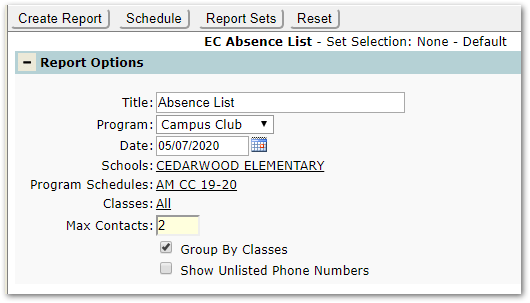
Title – The report name appears as the default title, but this may be changed.
Program – Select a Program to report. Programs available for selection may be defined by permission.
Date - Only one date can be reported per report. Enter the target date.
Schools – Schools available for selection will be based on permission. Select a school, if desired.
Program Schedules – Select Program(s) to report, if desired, or accept the default ‘All’.
Classes - Select a class or classes, if desired, or accept the default ‘All’.
Max Contacts - Students may have multiple contacts and contacts may have multiple phone numbers, which may take up too much space in the report. Select the maximum number of contacts to print per student.
Group by Classes - Select this option to group the entries by class.
Show Unlisted Phone Numbers – Select this option to include unlisted phone numbers.