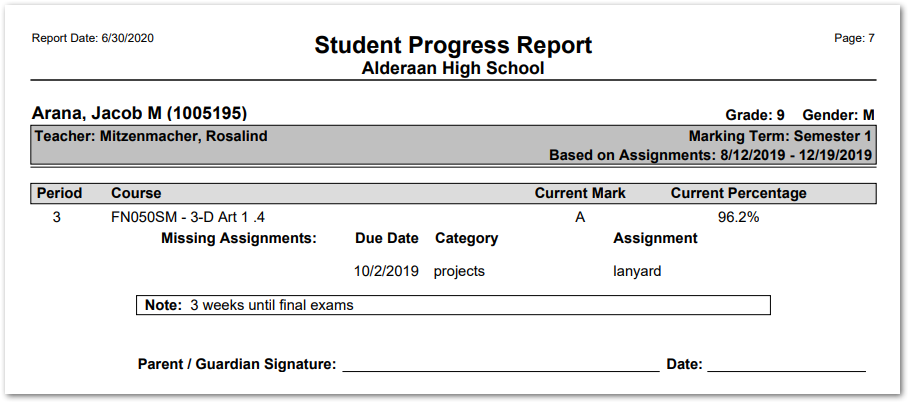
This report generates a progress summary for each student in a selected teacher’s class(es). These reports are suitable for printing and distribution. Each student’s progress is printed on its own page and includes the period, course title, current mark, and current percentage. Optionally, the report may include a list of missing assignments, a customizable note, and a parent/guardian signature line.
While details specific to this report will follow, users can find general information about reports within the Reports documentation.
Grade Book Progress Summary is located within Reports in the Marks menu in Q.
Report Options
The following options may be applied to the report: 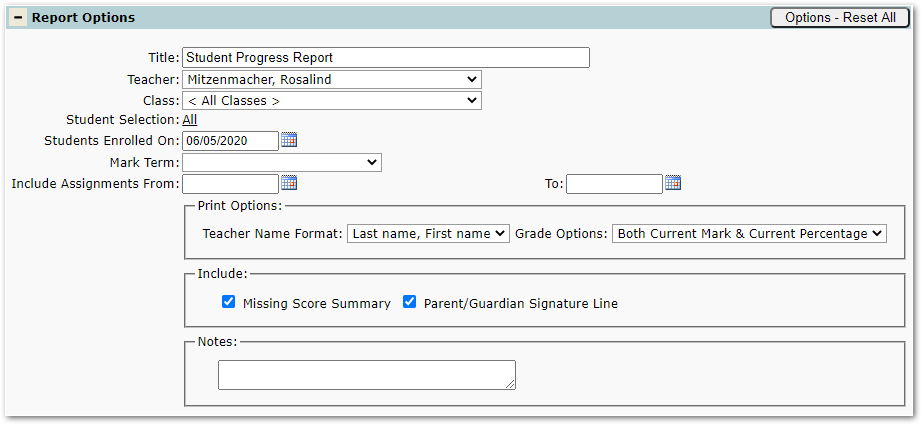
- Report Title – The title defaults to “Student Progress Report” but may be edited by the user.
- Teacher – District and school staff may select any teacher from the logged in track. When teachers run the report, their name will be preselected.
- Class – Choose all classes or any individual class of the selected teacher.
- Student Selection – Choose all students from the selected class(es) or click to select individual students to be included in the report.
- Students Enrolled On – Only those students enrolled in class on this date will be printed.
- Mark Term – Select from the terms available for the logged in track.
- Include Assignments From/To – Dates will default to the start and end dates of the selected term but may be edited as desired.
- Print Options
- Teacher Name Format – Options include:
- Last name, First name
- Title Last Name
- Grade Options – Options include:
- Both Current Mark & Current Percentage
- Current Mark Only
- Current Percentage Only
- Include – check to include the following:
- Missing Score Summary – A list of missing assignments, if any, includes due date, category, and title.
- Parent/Guardian Signature Line – Appears at the bottom of the progress report. See the sample below.
- Notes – Enter notes/comments to be printed on the progress report for each student included in the report.
- Teacher Name Format – Options include:
Example Reports
Sample Grade Book Progress Summary Report