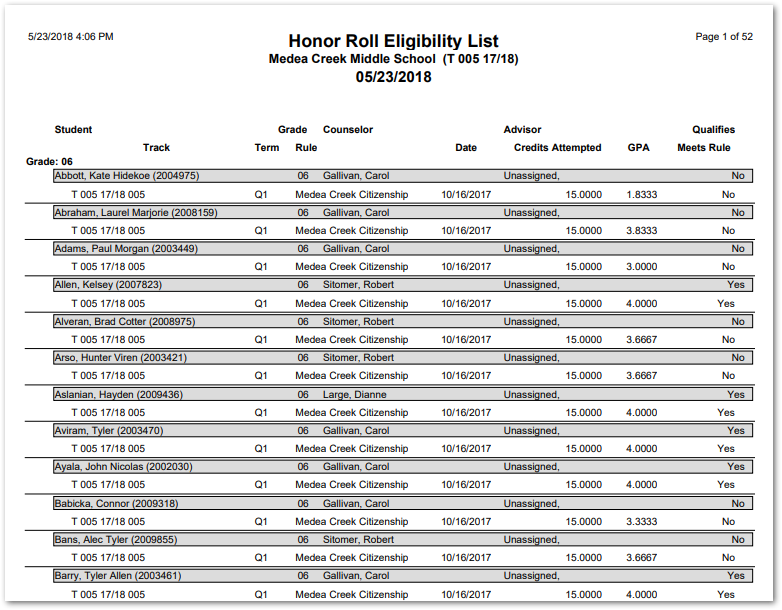
This report allows you to process students against multiple Honor Role rules. Students must meet the requirements of every selected rule to ‘qualify’. This capability is useful, for example, for checking the eligibility of students for extracurricular programs where GPA is not the only type of criterion that must be taken into consideration.
While details specific to this report will follow, users can find general information about reports within the Reports documentation.
Honor Roll Eligibility List Report is located within Reports in the Marks menu in Q.
Report Options
The Q Honor Roll Eligibility List report offers the following options:
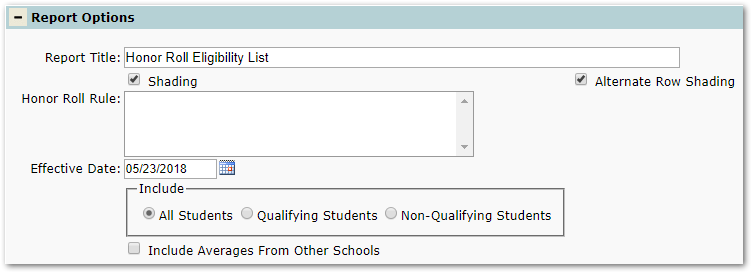
- Report Title—The default title of the report is Honor Roll Eligibility List but may be edited by the user
- Shading—Select to include shading on the report
- Alternate Row Shading—Check box to enable shading on alternate rows
- Honor Roll Rule—Using mouse clicks, select which rule or rules you want to be included in the report. To select or deselect more than one rule, hold the Ctrl key down while clicking (If this field has no selections, it means no Honor Roll Rules were predefined in the requirements application)
- Effective Date—Enter the effective date for screening the qualifications of students. The report will return the most recent records <= the effective date. Make sure that you have already processed (in the Mark Processing application) the Honor Roll rules you have selected above, at least up to this effective date
- Include—Select which students to include, according to their status
- Include Averages From Other Schools—Checking this option will include averages from part-time sites for those students who have multiple enrollments (enrolled in more than one track simultaneously)
Example Reports
Sample Honor Roll Eligibility List report