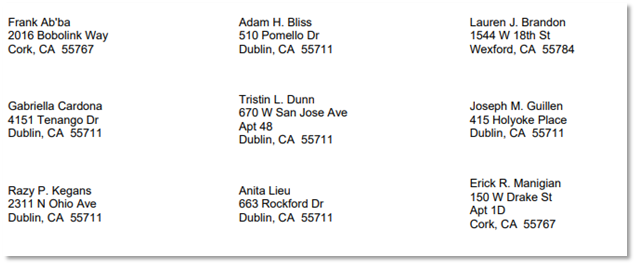
This report prints mailing labels for students for one or more classes.
While details specific to this report will follow, users can find general information about reports within the Reports documentation.
Class Mailing Labels Report is located within Reports in the Behavior menu in Q.
Report Options
The following options may be applied to the report:
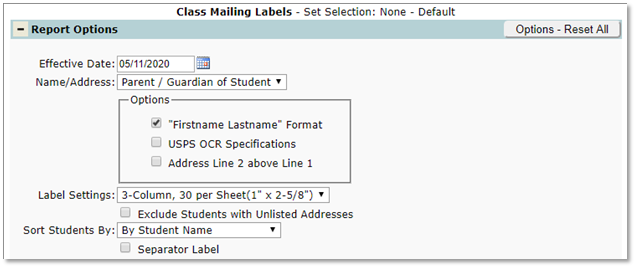
- Effective Date – The report creates mailing labels for students scheduled in the selected classes on this date.
- Name/Address– Select one from drop down list:
- Student – Label is addressed to the student.
- Parent / Guardian of Student – Label is addressed to “Parent or Guardian of”: on the first line with student’s name on second line.
- Options:
- Firstname Lastname Format – If not selected, the format will be last name first.
- USPS OCR Specifications – Prints labels using the USPS specifications required for OCR and/or barcode sorters.
- Address Line 2 above Line 1 – If not selected, address line 1 will be printed above line 2.
- Label Settings– The size and number of labels per page.
- 3-Column, 30 per sheet (1” x 2-5/8”)
- 2-Column, 20 per sheet (1” x 4”)
- 2-Column, 14 per Sheet (1-1/3” by 4”)
- Exclude Students with Unlisted Addresses – Check to exclude such students.
- Sort Students By– Determines how the labels will be sorted;
- Alphabetically by student name
- Zip code, then student names alphabetically.
- Separator Label – If checked, a label with the teacher’s name, and course will be inserted at the start of each class.
Example Reports
Report with Student Name/Address option selected