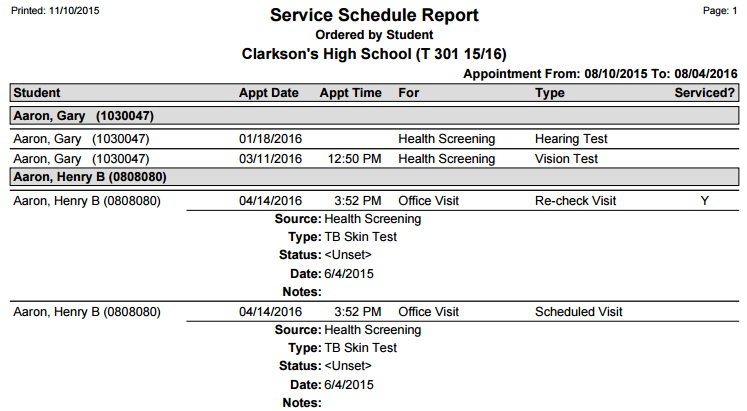
The Q Service Schedule Report prints Service records scheduled for the logged in user, or for a defined set of providers. The latter will only be available if the user has the Service Manager Administrator permission item.
While details specific to this report will follow, users can find general information about reports within the Reports documentation.
Service Schedule Report is located within Reports in the Health menu in Q.
Report Options
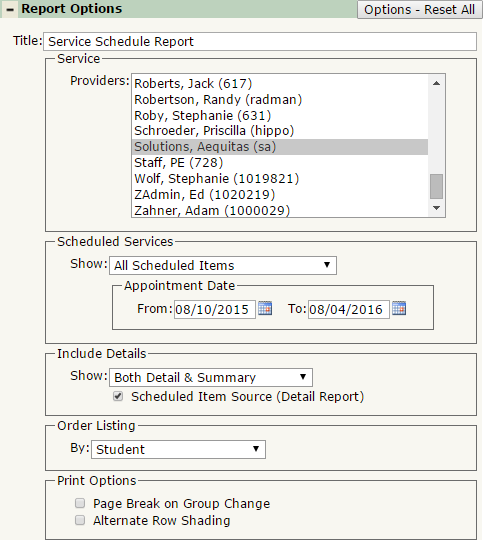
The Q Service Schedule Report offers the following report options:
- Title: Displays at the top of the printed report, rename here if necessary.
- Service Providers: The default and most common selection will be the logged in user. Only those with the Service Manager Administrator permission item will be able to select from a list of providers.
- Scheduled Services
- Show: The default is to show All Scheduled Items, but you may choose to filter the report to show only Non-Serviced or only Serviced Scheduled Items.
- Appointment Date: Use the date selection boxes to filter your scheduled services. Default dates are today to a week from now.
- Include Details
- Show: Select from Detail Report of Students, Summary Counts by Provider, or Both Detail and Summary.
- Scheduled Item Source (Detail Report): The Detail Report has the option to print the details of an Item Source, in cases where the Service record is a child record. (example below in Sample Report section)
- Order Listing By: Select to order the report by Student, Appointment Date, or Provider Scheduled With.
- Print Options
- Page Break on Group Change: Select this to jump to a new page when the group changes.
- Alternate Row Shading: Select this to print shading between records. This is useful when printing a large data set for an easier viewing experience
Example Reports
Report run for one user, with Scheduled Item Source on: