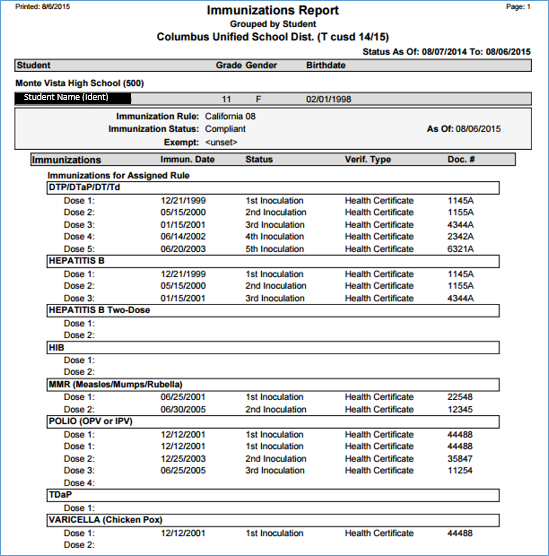
This report prints detailed Immunization records for a defined set of students.
While details specific to this report will follow, users can find general information about reports within the Reports documentation.
Immunizations Report is located within Reports in the Health menu in Q.
Report Options
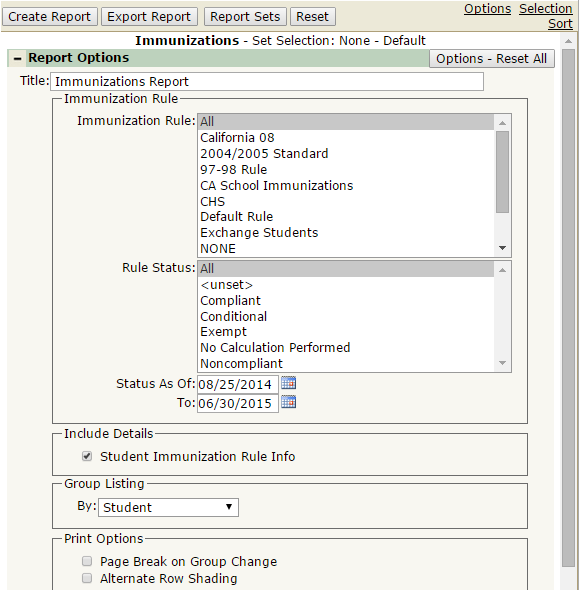
The Immunizations Report provides the following report options:
- Report Title: Displays at the top of the printed report. Rename here if necessary.
- Immunization Rule
- Immunization Rule: Select an Immunization Rule to filter the report by. Defaulted to ALL.
- Rule Status: Select a Rule Status to filter the report by. Defaulted to ALL.
- Status As Of/To: This works in conjunction with the Rule Status. For example, you can select all compliant students as of today, by putting todays date in the As Of This is defaulted to the beginning of the term, to the system date.
- Include Details: Student Immunization Rule Info: When checked, the report will include an extra band of information below the student’s name, with Immunization Rule, Status and Exemption (if one is set)
- Group Listing by: Choose between Student, Immunization Rule, and Rule Status. The report will group students based on this selection.
- Print Options
- Page Break on Group Change: If checked, the report will jump to a new page when the group changes. This only takes effect if you’ve selected something in the Group Listing by section.
- Alternate Row Shading: If checked, the report will print shading between each section.
Example Reports
Report run with default settings with Student Immunization Rule Information checked: