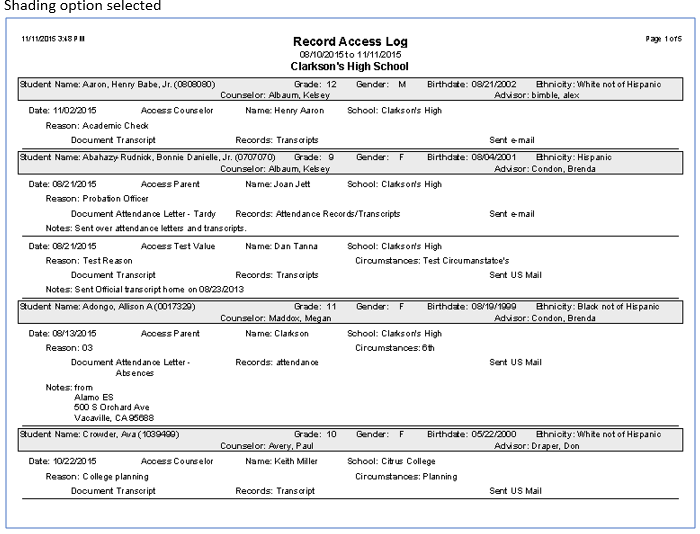
The Q Records Access Log Report prints a listing of students who have Records Access requests entered through the Records Access application. The report may be run for user defined access types and date ranges.
While details specific to this report will follow, users can find general information about reports within the Reports documentation.
Records Access Log Report is located within Reports in the Enrollment menu in Q.
Report Options
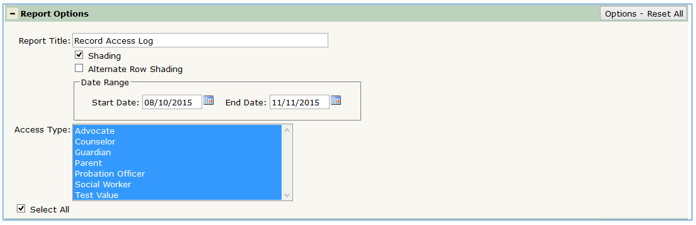
The Q Records Access Log Report offers the following report options:
- Title: Displays at the top of the printed report, rename here if necessary.
- Shading: Select this option to shade student names and report sort headings.
- Alternate Row Shading: Select this option to shade alternate records when a student has multiple records.
- Date Range: The start and end dates default to the first day of the track to today but may be changed by the user.
- Access Type
- Defaults to Select All, remove the check from the Select All box to enable individual Access type selections.
- Select individual types from drop down list by selecting type, Ctrl-click to select multiple types.
Example Reports