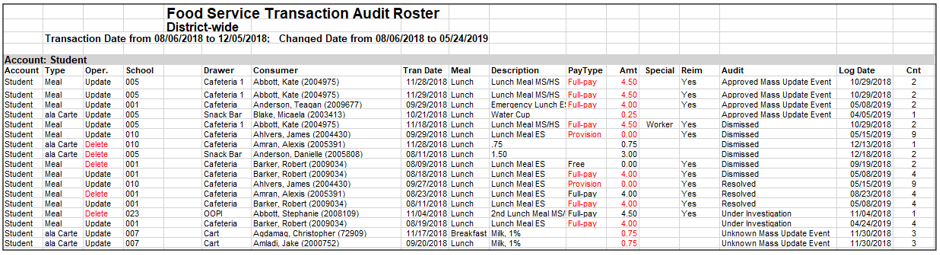
The Security Transaction Roster provides the user with a report of Food Service Point of Sale audit information that can be filtered by transaction and change dates and by:
- Account – Students, Staff, Patron, Cash, Journal and Visitors
- Transaction - Payments, Meal Service, and ala Carte
- Operation - Update and Delete
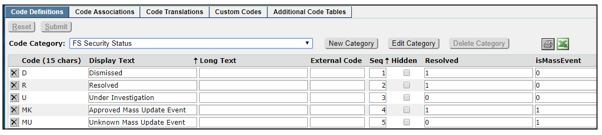
- Audit Status – Dismissed, Resolved, Under Investigation and Approved/Unknown Mass Update Events (and others as defined in Lookup Codes - FS Security Status)
This report assists with tracking down changes or deletions of food service transactions made in Food Service Accounts, Payments, Data Entry, Cafeteria and mass changes made directly in the database and mirrors the data found in the Food Service Security App.
While details specific to this report will follow, users can find general information about reports within the Reports documentation.
Security Transaction Roster is located within Reports in the Food Service PoS menu in Q.
Like many Food Service reports, by default, the Security Transaction Roster looks to the System Date to define the Transaction Date range, using the system date as the To date and going back to first of that month for the From date.
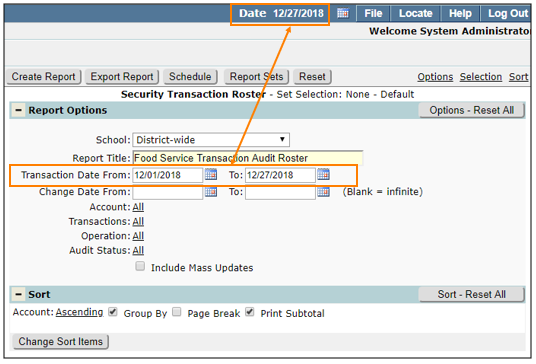
The Change Date range can be set based on when the changes possibly occurred or left blank to search all dates.
Filtering
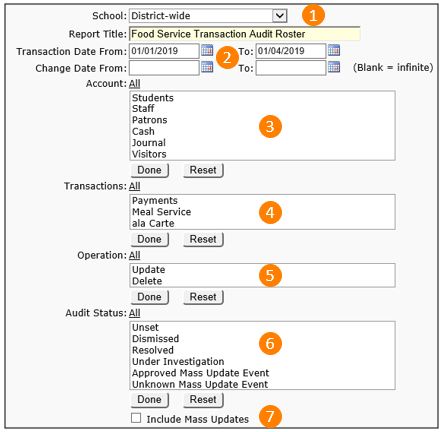
- Select a school or district wide.
- Confirm or fill in the date range for the original transaction(s) and then the date of the change(s).
- Select the Account type(s) for report. Use the CTRL key to select more than one.
- Choose the Transaction type.
- Select an Operation.
- Pick an Audit Status. These choices are customizable through the Lookup Codes.
- Check Include Mass Updates to incorporate transaction changes made directly in the database.
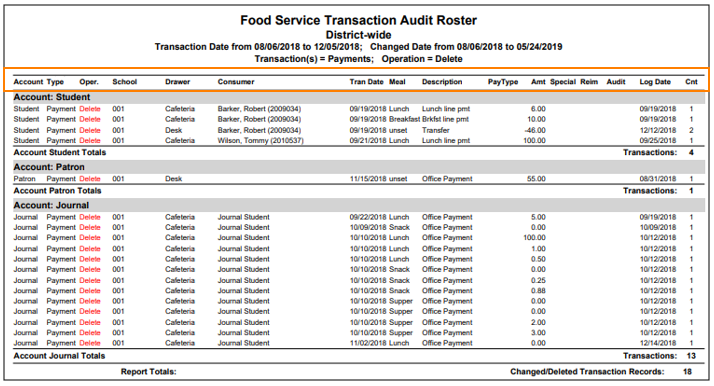 The spreadsheet example below shows a variety of change types. Most column headings are obvious. The last column on the right, Cnt, is the number of times the transaction record has been changed.