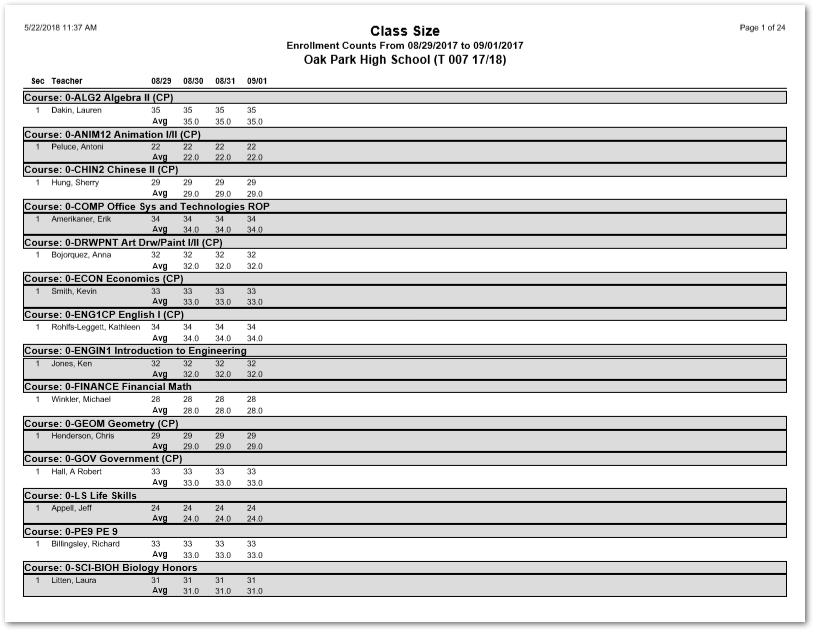
This report is a listing of course sections in the Master Schedule with class enrollment counts for each school day within a user specified date range. A daily running average of the class enrollment is also calculated and printed.
While details specific to this report will follow, users can find general information about reports within the Reports documentation.
Class Size Report is located within Reports in the Schedule menu in Q.
Report Options
The Q Class Size Report offers the following options:
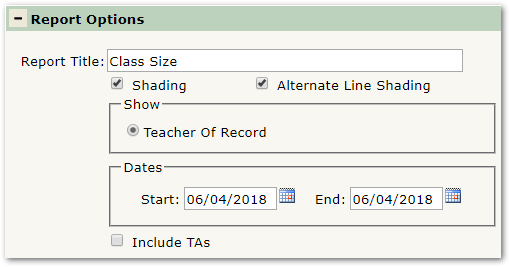
- Report Title—The default title of the report is Class Size but may be edited by the user
- Shading—Select to include shading on the report
- Alternate Line Shading—Check box to enable shading on alternate rows
- Faculty History—Select to print a row for each teacher that was assigned to a section. The report will print counts only on the days the teacher was assigned
- Teacher of Record—Select to print a single row under the current teacher only. The report will print a count for the entire date range, even if the teacher was not assigned to the section on that date
- Dates—Enter a date range for class size counts
- Include TAs—Select to include TAs in the class enrollment count
Example Reports
Note: Reports may look different depending on options, selections, and sorting.
Sample Class Size report