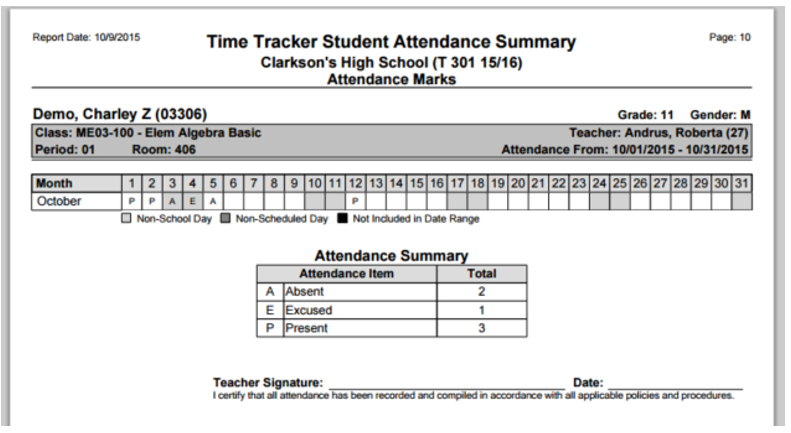
This report displays Time Tracker data for an individual student in a particular class for a selected date range. The student’s total attendance hours may be calculated for the Time Type designated. Each student is reported on a separate page, with an optional teacher signature line.
While details specific to this report will follow, users can find general information about reports within the Reports documentation.
Time Tracker Student Attendance Summary Report is located within Reports in the Attendance menu in Q.
Report Options
The Time Tracker Student Attendance Summary Report offers the following options:
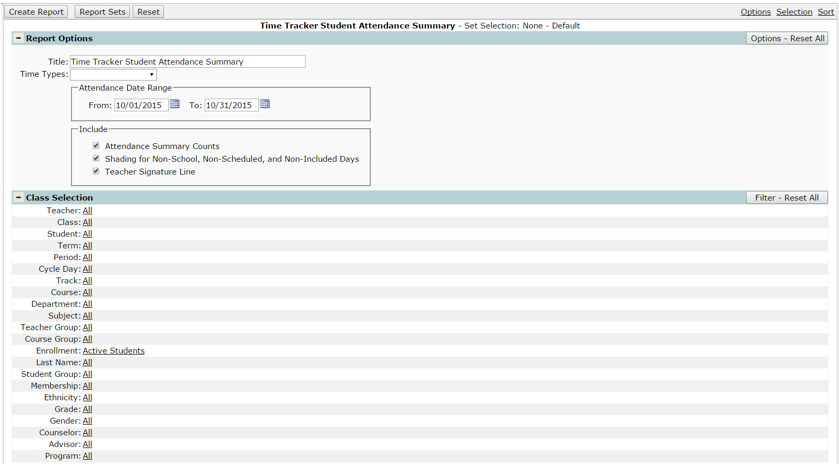
- Title – the report title defaults to Time Tracker Student Attendance Summary, but this can be edited, and a user defined title can be entered.
- Time Types – the report can be run for all time types, but only a single Time Type at a time.
- Attendance Date Range – The attendance date range defaults from the first day of the month to the last day of the month. Users may change the date range to include data for multiple months.
- Include:
- Attendance Summary Counts – gives a total of the time type selected (defaulted on).
- Shading for Non-School, Non-Scheduled, and Non-Included Days – shades dates according to school days, and scheduled days for the selected class meeting (defaulted on).
- Teacher Signature Line – prints only if selected (defaulted on).
Example Reports
Sample report with Attendance Marks Time Type selected, and all ‘Include’ options turned on.