
Have you ever needed to upload a file that exceeded the maximum file size in Q? Do you want to prevent parents from uploading excessively large files in Pre-Enrollment or Parent Connection?
System administrators can control the maximum file size allowed in the various parts of Q, Pre-Enrollment, and Parent Connection.
Web.config
To adjust the max file size you need access to the web.config file in the ParentPortal, PreEnroll, and/or Q directories. The screenshot on the left shows an example of the Web.config file location in a PreEnroll site.

Open the file in a text editor and find maxRequestLength. ParentPortal and PreEnroll only have one maxRequestLength while the Web.config in Q has multiple:
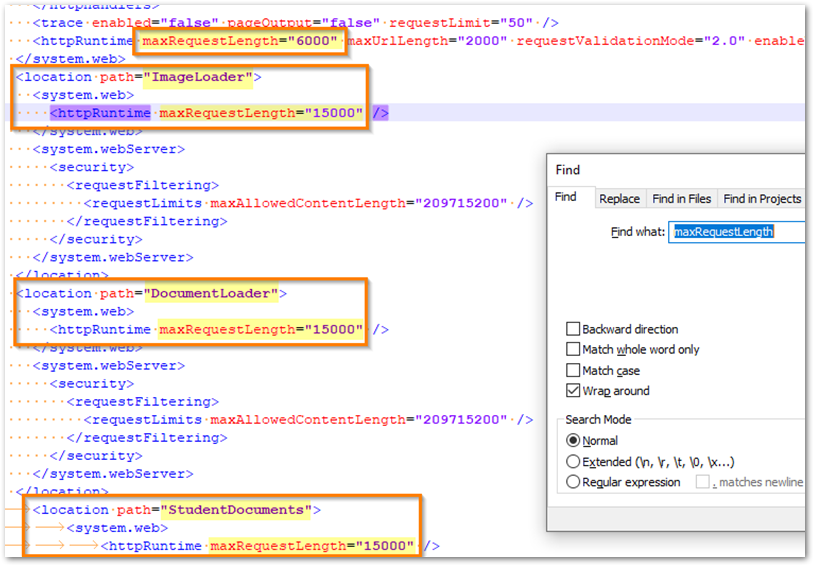
Set the maxRequestLength equal to the number of kb that you want to allow users to upload. In the Q config file, the first maxRequestLength represents a default upload size for all Q applications. Below that, some apps have their own maxRequestLength so that you can set different upload sizes for different apps. If an end user tries to upload a value larger than you allow they will receive an error:
