
Daily Medications Scheduled
The Q Daily Medications Scheduled Report prints a list of health contacts linked to each student, as stored in the Student Health application.
While details specific to this report will follow, users can find general information about reports within the Reports documentation.
Daily Medications Scheduled is located within Reports in the Health menu in Q.
Report Options
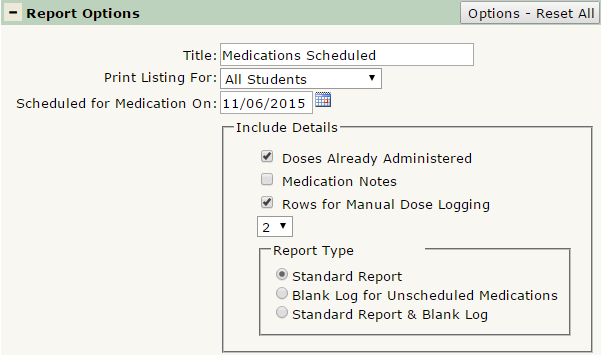
The Q Daily Medications Scheduled Report offers the following report options:
- Title: Displays at the top of the printed report, rename here if necessary.
- Print Listing For: Select one of the following: All Students, All (w/o As Needed), or Non-Serviced. Printing the listing for All (w/o As Needed) will print all students that have medications listed to be administered Daily, or Once Daily.
- Scheduled for Medication on: Defaults to today, select the date the report will print scheduled medications for.
- Include Details
- Doses Already Administered: Select to display medications already administered for the specified day.
- Medication Notes: Select to include any notes associated with each medication.
- Rows for Manual Dose Logging: When this is checked, and the number of rows selected, the report will print extra blank rows for each medication for manually logging dose information, which can later be entered into the Student Health application.
- Report Type – 3 report formats to choose from:
- Standard Report: Shows scheduled medications and details included.
- Blank Log for Unscheduled Medications: Shows only blank forms for manually entering dose information for medications that are not yet scheduled in the system.
- Standard Report & Blank Log: Prints the standard report with one page of blank logs added at the end.
