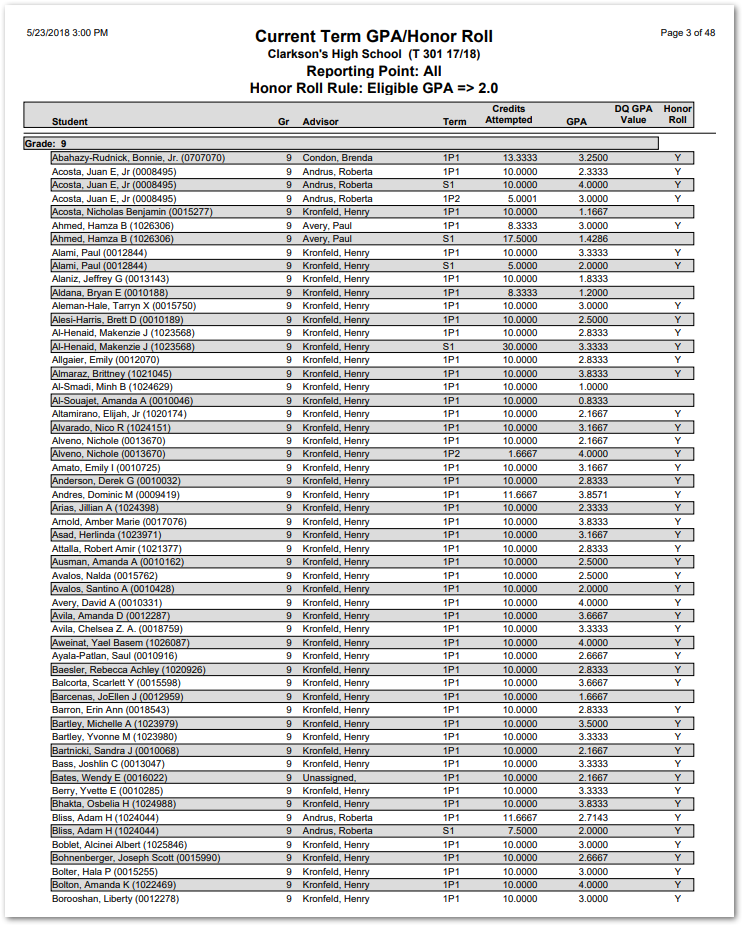
Once Mark Processing has been run with the proper Honor Roll settings made (refer to QWiki help – Marks Processing), you may run the Current Term GPA/Honor Roll Report to review students’ Honor Roll eligbility, Credits Attempted, and GPA.
While details specific to this report will follow, users can find general information about reports within the Reports documentation.
Current Term GPA/Honor Roll Report is located within Reports in the Marks menu in Q.
Report Options
The Q Current Term GPA/Honor Roll report offers the following options:
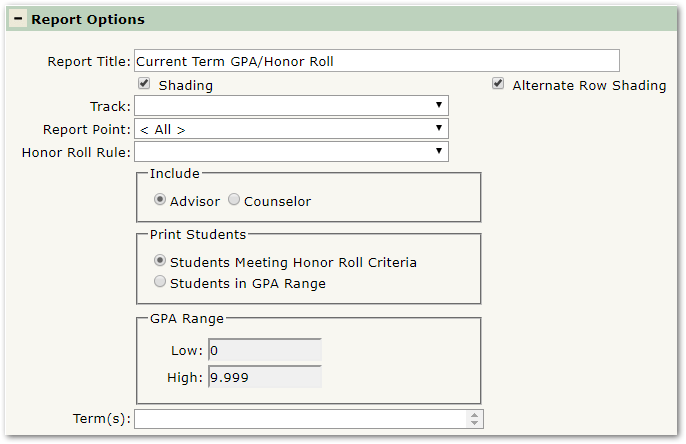
- Report Title—The default title of the report is Current Term GPA/Honor Roll but may be edited by the user
- Shading—Select to include shading on the report
- Alternate Line Shading—Check box to enable shading on alternate rows
- Track—Select the target Track to report
- Report Point—Choose the Mark Reporting Point for which to print the Honor Roll
- Honor Roll Rule—Choose the Honor Roll Rule to apply to the report
- Include—Select whether you would like to include the name of each student’s Advisor or Counselor
- Print Students Meeting Honor Roll Criteria—Check this selection to print only students who qualified for the Honor Role (according to the rules and parameters configured)
- Print Students in GPA Range—When this option is selected the user can restrict or filter the records by defining a GPA range in the fields provided. Checking this selection will cause the report to print an entry for ALL students in the GPA range, whether they qualified for the Honor Roll or not
- Term(s)— Select the Term(s) that you want to include on the report
Example Reports
Note: Reports may look different depending on options, selections, and sorting.
Sample Current Term GPA/Honor Roll report