
A couple years ago, we made a change to Q Parent Connect to ensure when a parent logs into Parent Connect, they will only be able to Edit/Delete Emergency Contacts that were entered by another contact who lives in the same household as the logged in parent.
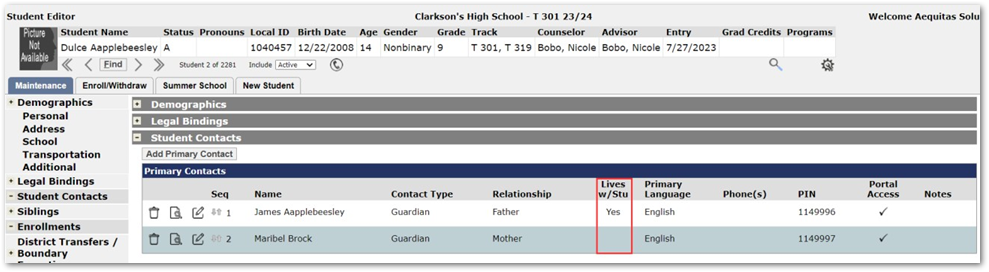
For example, my sample student below has two primary contacts entered – one lives with the student and the other lives in a different household:
When contact James Aapplebeesley logs into Parent Connect and goes to the Emergency Contacts section, notice he can only edit/delete one emergency contact that is entered. He can edit the record for Susan but cannot edit the record for John:
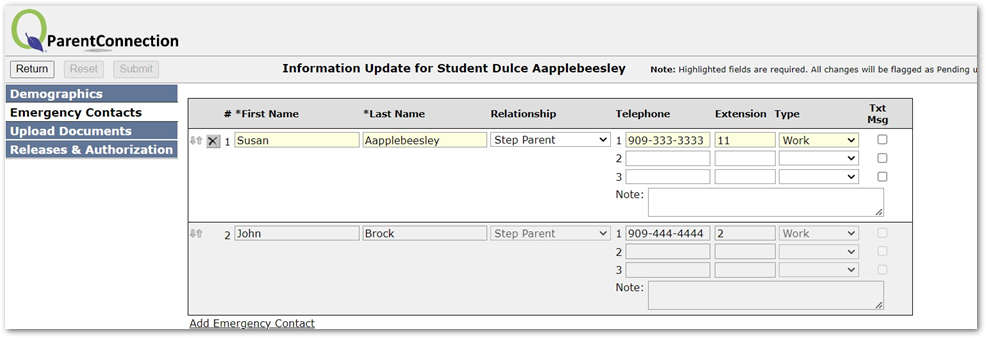
This is because the emergency contact record that is not editable was entered by the student’s other primary contact, Maribel Brock, that does not live in the same household as James Aapplebeesley.
Likewise, when Maribel Brock logs into Parent Connect, she will only be able to edit the record for the emergency contact she has entered, John Brock:
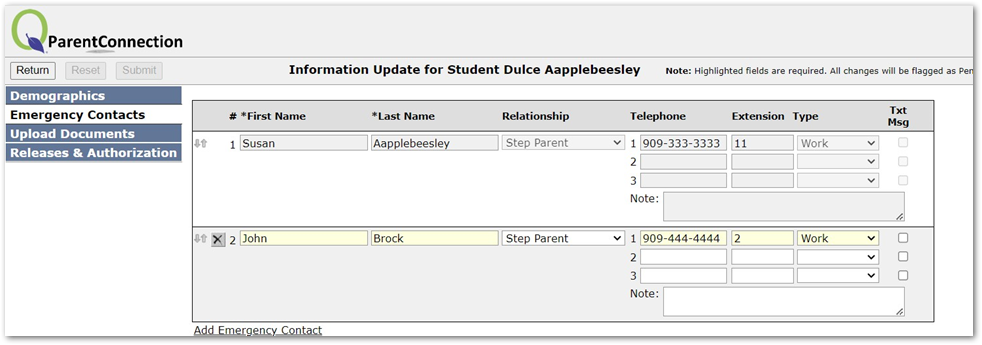
Notice though, both primary contacts still have the ability to Add additional emergency contacts if need be and the same rules will apply for any additional emergency contacts added.
The field that determines whether a contact can edit/delete existing emergency contacts is the chgbyconuniq value in the emergencycontacts table. This field will store the conuniq value of the contact who entered the emergency contact information. If this field is NULL (due to the emergency contact being entered into the system prior to us making this change), the emergency contact will be editable for all contacts who have access to edit emergency contact information.