
The Class Attendance Spreadsheet report produces class rosters with the student’s attendance records for a defined date range. The report may also be printed as a blank class attendance collection roster.
While details specific to this report will follow, users can find general information about reports within the Reports documentation.
Class Attendance Spreadsheet Report is located within Reports in the Attendance menu in Q.
Report Options
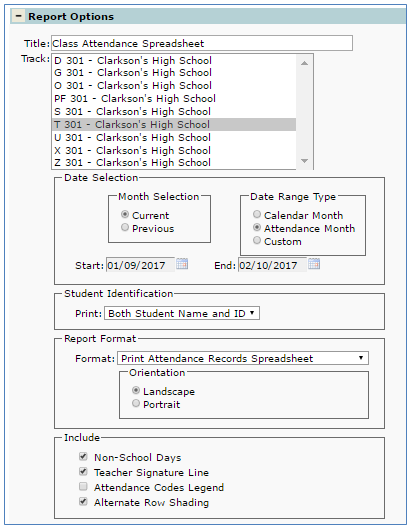
The Class Attendance Spreadsheet provides the following options:
- Title – Defaults to Class Attendance Spreadsheet but may be changed by user
- Track – All tracks for logged in school display, select desired track
- Date Selection – Use this option to define a date range for reporting. There are predefined selections and a custom option.
- When the Month Selection Currentradio button is selected:
- The Date Range Type selection of Calendar Month will set the Start and End dates to match the calendar month in which the current System Date falls.
- The Date Range Type selection of Attendance Month will set the Start and End dates to match the attendance month (as defined in the Track Calendar of the selected track) in which the system date falls.
- When the Month Selection Previousradio button is selected:
- The Date Range Type selection of Calendar month will set the Start and End dates to match the calendar month previous to the calendar month in which the current System Date falls.
- The Date Range Type selection of Attendance Month will set the Start and End dates to match the calendar month previous to the calendar month in which the current System Date falls.
- The selection of Custom will enable the user to edit the Start and End dates in order to create a custom date range. The maximum number of days that may be reported is 61.
- When the Month Selection Currentradio button is selected:
- Student Identification – Select desired student identification option from drop down list:
- Both Students name and ID.
- Student ID only
- Report Format – Select desired from drop down list:
- Print attendance records spreadsheet
- Print blank attendance collection spreadsheet
- Orientation
- Landscape
- Portrait
- Include—Place a check in the box to include on the report:
- Non School Days, leave box blank to print only school days on report.
- Teacher Signature line
- Attendance Code Legend
- Alternate Row Shading
Example Reports
Class Attendance Spreadsheet Report with attendance records
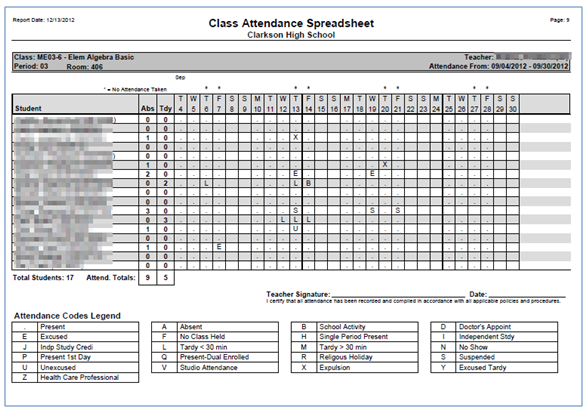
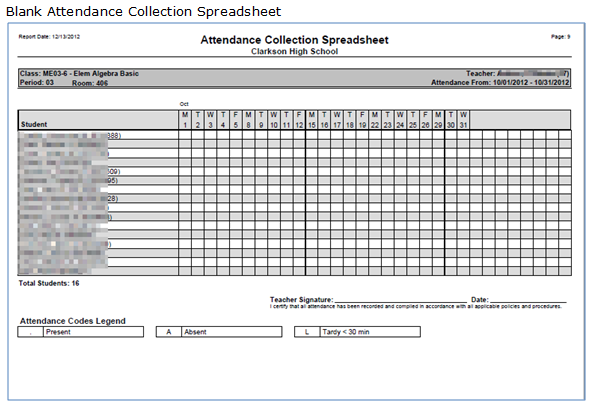
NOTE: Reports may look different depending on options and selection choices.
