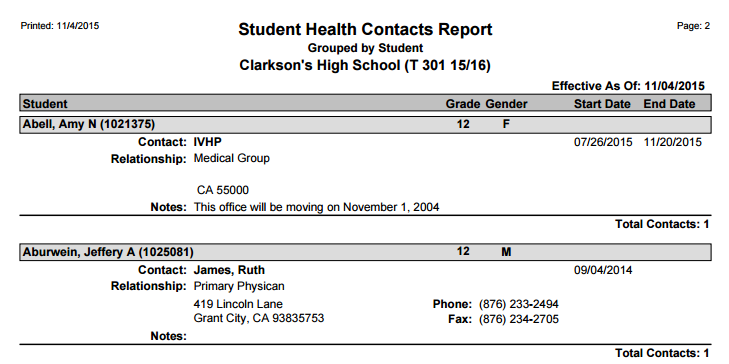
The Q Health Contacts Report prints a list of health contacts linked to each student, as stored in the Student Health application.
While details specific to this report will follow, users can find general information about reports within the Reports documentation.
Health Contacts is located within Reports in the Health menu in Q.
Report Options
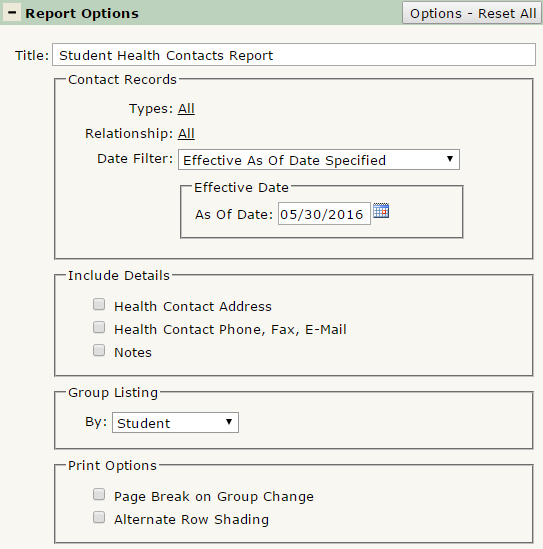
The Q Health Contacts Report offers the following report options:
- Title: Displays at the top of the printed report, rename here if necessary.
- Contact Records:
- Types: Defaulted to ALL, click to select which type of contacts to return data on. Control-click to select multiple contact types.
- Relationship: Defaulted to ALL, click to select which contact relationship types to return data on. Control-click to select multiple contact relationship types.
- Data Filter: Select either Effective As Of Date Specified or Effective within Specified Date Range. The date selection boxes below will adjust based on your choice.
- Include Details:
- Health Contact Address: Select this box to include the contact’s mailing address, if available.
- Health Contact Phone, Fax, Email: Select this box to include the contact’s Phone, Fax and Email Address, if available.
- Notes: Check this box to include any notes associated with a Health Contact record.
- Group Listing By: Select to group the report by Student or Health Contact.
- Print Options:
- Page Break on Group Change: Select this box to jump to a new page when the group changes.
- Alternate Row Shading: Select this to print shading between consent records. This is useful when printing a large data set for an easier viewing experience.
Example Reports
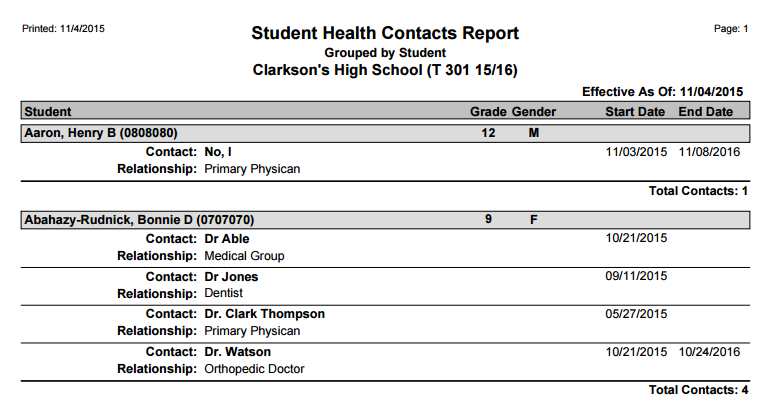
Report printed with default options:
Report printed to include Health Contact Address, Phone, Fax, Email, and Notes: