For districts using ParentConnection for their annual re-enrollment process, this report generates a list of students whose parent/guardian has completed the re-enrollment process, has not yet completed the re-enrollment process, or has no access to the online re-enrollment process.
While details specific to this report will follow, users can find general information about reports within the Reports documentation.
Re-enrollment Listing Report is located within Reports in the Enrollment menu in Q.
Report Options
The following options may be applied to the report: 
- Title – The default title may be customized by user.
- Report Type –There are three available options. See the sample reports below.
- Completed Re-Enrollment
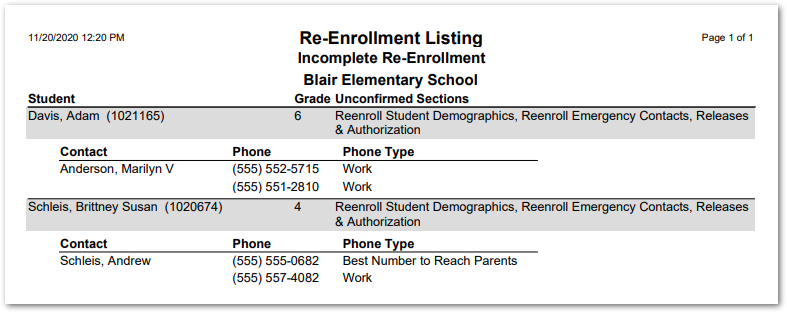
- Incomplete Re-Enrollment – This report type includes three additional options.

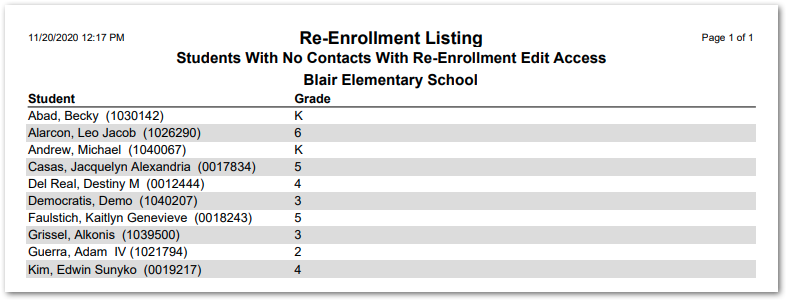
- Exclude students with no contacts with re-enrollment edit access – Uncheck to include such students in the report.
- Include Unconfirmed Sections – Lists the sections of the re-enrollment process where the contact has not checked the box to confirm the information in that section is complete and correct.
- Include Contacts – Check to include contact names and phone numbers.
- Students with no contacts with re-enrollment access
- Alternate Row Shading – Enable alternate row shading for readability.
- Disable All Shading – Check to remove all shading and save ink or toner when printing the report.
Example Reports
Completed Re-Enrollment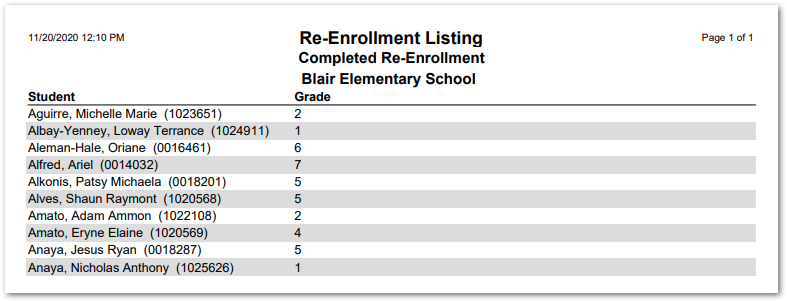
Incomplete Re-Enrollment
Students With No Contacts With Re-Enrollment Edit Access