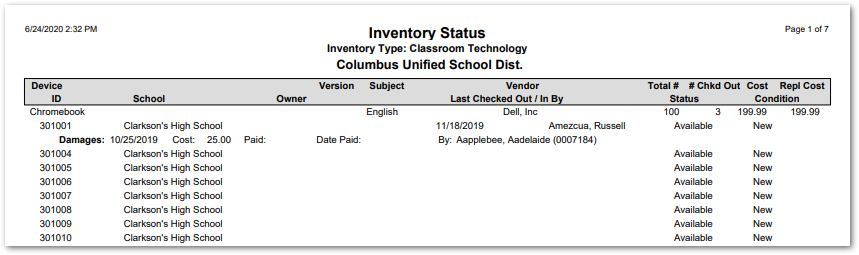
This report provides a useful overview of inventory by types. The report includes information such as the number of items, cost, vendor, and condition. The status descriptions are set using the Inventory Setup Application and are typically used to indicate if items are checked out, available, under repair, etc.
While details specific to this report will follow, users can find general information about reports within the Reports documentation.
Inventory Status Report is located within Reports in the School menu in Q.
Report Options
The following options may be applied to the report:
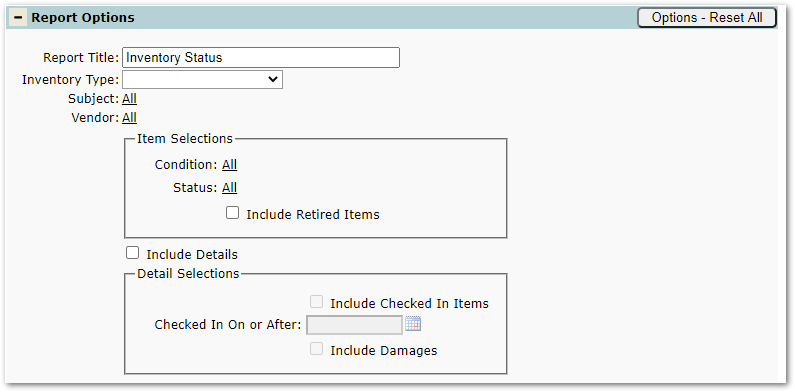
- Report Title – The default title of the report is “Inventory Status” but may be edited by the user.
- Inventory Type – The list populates with the types created using the Inventory Setup App.
- Subject – Restrict the report to inventory associated with specific subjects.
- Vendor – Restrict the report to inventory supplied by specific vendors.
- Item Selections
- Condition – Populates with options created in Inventory Setup (e.g. new or refurbished).
- Status – Populates with options created in Inventory Setup (e.g. checked out or lost).
- Include Retired Items – Check to include retired inventory items.
- Include Details – If checked, the options below are enabled.
- Detail Selections
- Include Checked In Items – Check to include checked in inventory items.
- Checked In On or After – Restricts the report to items checked in as of a specified date.
- Include Damages – Includes details about damaged inventory.
Example Reports
Sample Inventory Status Report