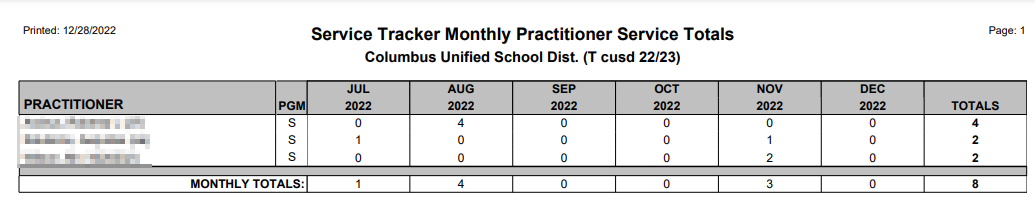
This report displays the total number of services for each practitioner within the specified time frame. These counts will not be broken-down by school on the report, but if the user is logged in to the district office, they can choose which schools to include. Also, Administrators may select which Practitioner(s) to include, while Practitioners will only get counts for themselves.
While details specific to this report will follow, users can find general information about reports within the Reports documentation.
Service Tracker Monthly Practitioner Service Totals Report is located within Reports in the Programs menu in Q.
The ST Monthly Practitioner Service Totals report offers the following options: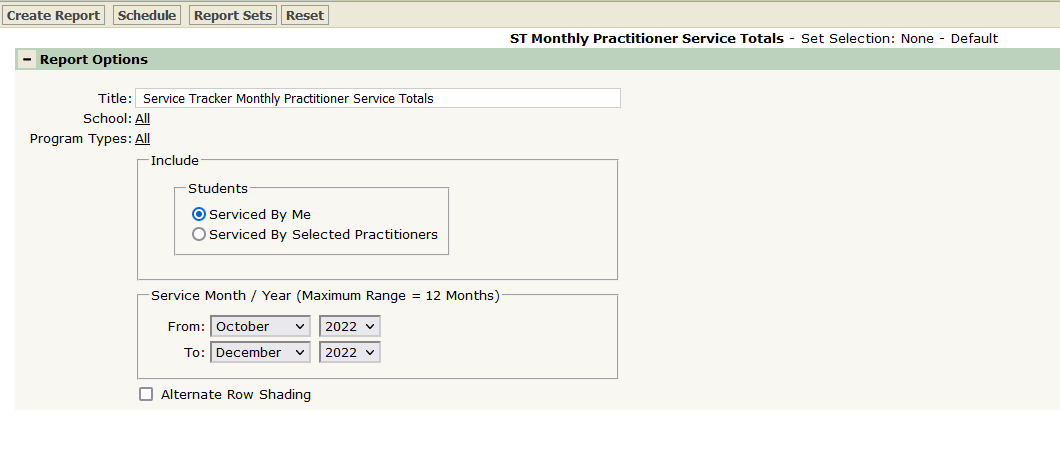
- Title – A default title is provided but may be changed as desired.
- School – Only selectable when logged into the District Track and/or when the District Preference to ‘Include Students from All Schools’ is ON. If the preference is OFF and the user is logged into a school, only the logged in school will appear in the School selection field.
- Include Students:
- Serviced by Me – Students included in the report are limited to those on the Caseload of the Practitioner when the Practitioner does not have Service Tracker Administrative permissions.
- Serviced by Selected Practitioners – this option appears only when the user has Service Tracker Administrator permissions. When selected, the user may then select all or specific practitioners.
- Service Month/Year – Select the service month/year date range for the report for a maximum of 12 months.
ST Monthly Practitioner Service Totals Sample Report