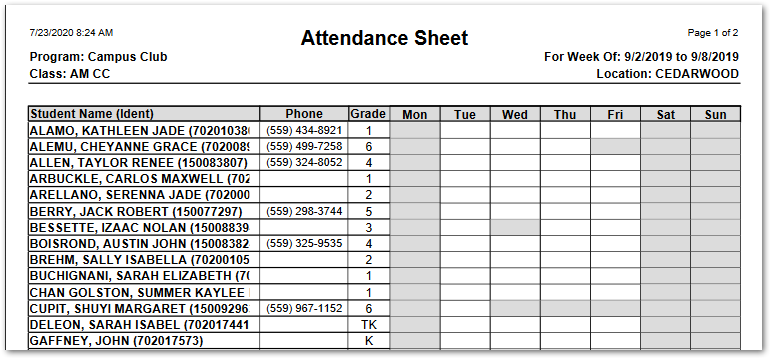
The EC Attendance Sheet prints the class roster with a one-week grid for taking a quick initial tally for the presence of students in a class. Non-scheduled days have grayed-out boxes.
While details specific to this report will follow, users can find general information about reports within the Reports documentation.
EC Attendance Sheet is located within Reports in the School menu in Q.
Report Options
EC Attendance Sheet’s Report Options enable the user to: 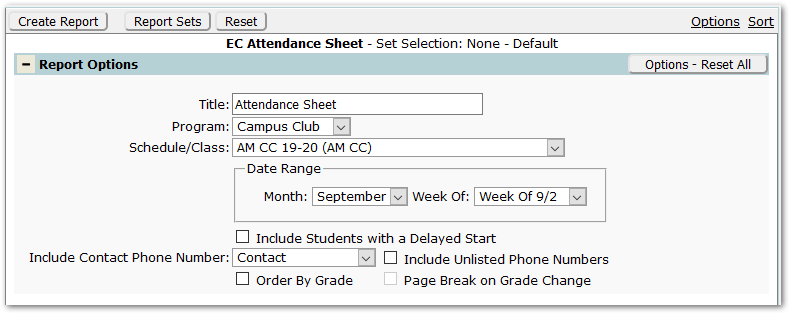
- Title – The default title of ‘Attendance Sheet’ will appear, but it may be edited and revised.
- Program – A program must be selected.
- Schedule/Class– Select the desired class schedule.
- Date Range – Select the Month and Week for the sheet
- Include Students with a Delayed Start – Check to include students who enrolled after the Monday of the selected week.
- Include Contact Phone Number – Select the type of Contact phone number to include from among those defined by the district.
- Include Unlisted Phone Numbers – Check to include unlisted phone numbers.
- Order by Grade - Check to change the order from alpha by student, to alpha by grade.
- Page Break on Grade – If Order by Grade is checked, this option becomes enabled. If you’d like a new sheet per grade, check this option.
Example Reports
Reports may look different depending on the options, selections, and sort items chosen.
The sample below is ordered alphabetically by student, not by Grade. Shaded boxes indicate the student is not scheduled on that day.