
There are various food service processes that need to be completed in Q to maintain and rollover food service data. These processes occur during different times of the school year. The following is a checklist that can be used to view the order in which food service procedures should be run.
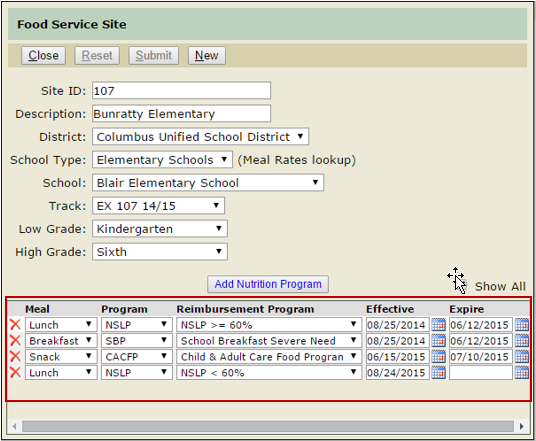
If your district is maintaining the Food Service Nutrition Program schedule (used for meal eligibility and reimbursement reporting), expire last year’s or your Summer School program, and configure the upcoming year’s program(s).
- Meal reimbursement rates will be supplied by Aequitas when they become available.
- Meal Rates: Configure new meal rate records in the event of meal price changes (do not edit existing rates, expire old rates and create new rates using effective dates).
- Menu Items: Make menu changes as required, expiring and adding new Ala Carte pricing records as required.
- Cash Drawers: As required.
- Registers: As required.
- Provision & CEP: Configure Provision 2 sites for schools who completed their base year last year, Extend Provision Expire dates as required, Configure Community Eligibility schools as needed
- Taxes: As required.
- Reimbursement: Federal reimbursement rates are updated yearly by Aequitas via SQL Script. If you wish to print reimbursement reports for other reimbursement programs, user-defined reimbursement rates may be defined.
Online and hand-entered Eligibility Applications may be processed on or after July 1 (Providing the Eligibility new-year rollover function has been performed, and the Income Guidelines are in place). Federal Income Guidelines are updated yearly by Aequitas via SQL Script.
Online (as well as paper) Applications should be processed often to avoid the need for retroactive meal updates. Q has the ability to notify user(s) of incoming online applications using Q Notifications.
Direct Certification files should be processed (imported) as soon as possible after they are received. Q Food Service supports retroactive effective dates, but should be avoided if possible as it will retroactively update meal service records, affecting student balances and invalidating eligibility and POS reports after they have been produced.
- The Direct Certification app includes a utility function entitled “Certify Household Siblings” that will assist you in directly certifying siblings of students certified during the import process. This should be used each time a direct cert file is processed.
Each year on October 1, a procedure should be executed automatically on your database. This procedure compiles the Eligibility statistics required for random sampling and reporting of applications for the yearly Verification process. It is strongly suggested to print a Verification Selection Roster and/or Verification Collection Report (available via the Verification tab of the Verification app.) on October 2nd in order to inspect and verify the accuracy of the information compiled by the procedure.
Once satisfied with the report(s), continue with the Verification process by compiling, confirming, and committing your Verification Pool, generating notices, etc.
While Verification reports are not due until February, the deadline for processing Verification responses is Nov. 15th.
If your district uses a separate database for summer school, there is a document and procedures available for preparing a copy of the district database for use with summer school, and for transferring summer school transactions back to the district database after summer school. Please contact Aequitas customer support for these items.
If you use summer school track(s), the only action required before beginning summer school service is to configure pricing, menu items, and registers as required.
If your summer meals are reimbursed by the Summer Food Service Program (SFSP), and you wish to produce reimbursement reports, you will need to configure the sites using this program (see New Year Point-Of-Sale Configuration item #1).
Prior to accepting Online Applications for the new school year, and prior to applications processing, the Eligibility New Year Rollover process must be completed. Begin this process by logging on to a district track for the upcoming school year.
The Point-Of-Sale New Year Rollover calculates balances as of the end of the previous fiscal year (June 30th), archives and removes payment, meal, and ala carte transactions on or before the end of the previous fiscal year (June 30), and creates a new balance forward payment record dated July 1. This same process, using the same dates, takes place regardless of when the function is executed. Most commonly, this function is performed after summer school has ended and prior to the new school year. If the function is run after the school year has begun, the June 30th cutoff date will still be enforced, and new year transactions will not be affected.
