
The Test History report is used to print a report of the standardized test scores by student for selected students.
This report may be run from within the Student Test History application for the selected student by clicking the printer icon.
Test History Report is located within Reports in the Testing menu in Q.
Report Options
The Test History report offers the following options: 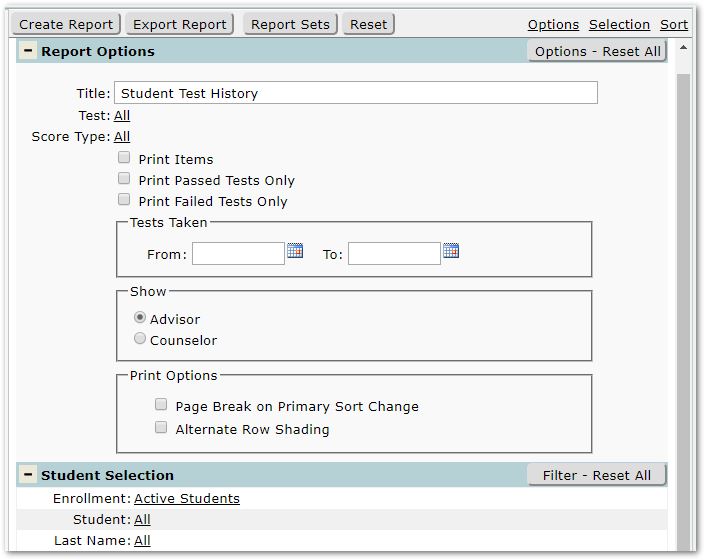
- Title – A default title is provided, but may be changed as desired.
- Test – Select specific test(s) or accept the default All tests to report.
- Score Type – Select specific score types or accept the default All Score types.
- Print Items – Check this box to include Test items in the report.
- Print Passed Tests Only – Check to include only tests where the ‘Passed’ flag is checked. Note: A test will not be included based on a passing score alone.
- Print Failed Tests Only - Check to include only tests where the ‘Passed’ flag is NOT checked.
- Tests Taken – tests with dates within the date range specified will be included.
- Show:
- Advisor - Toggle to indicate whether to include the student’s advisor
- Counselor - Toggle to indicate whether to include the student’s counselor
- Print Options
- Page Break on Primary Sort Change – Check to force a page break on a change in the primary sort order.
- Alternate Row Shading – Check if alternate row shading is desired.
Example Reports
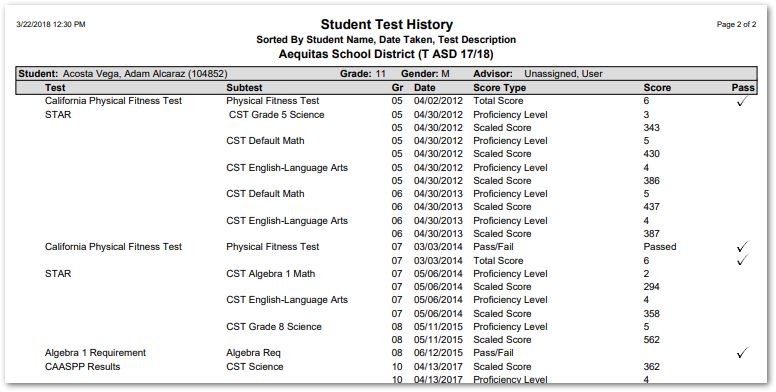
Sample Test History Report
