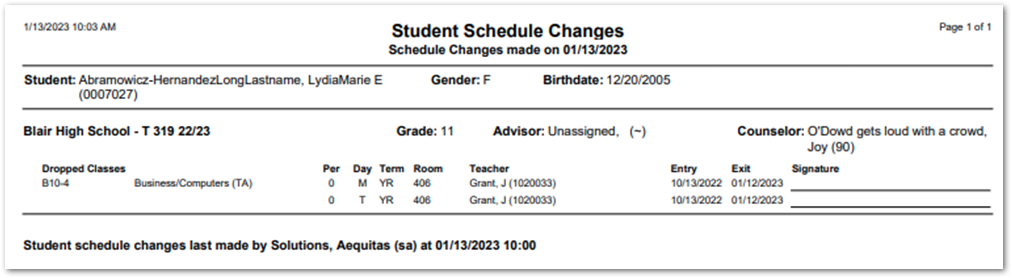
Do you ever get annoyed when every time you make any change in Student Schedules the report runs no matter how small or if you even need the changed schedule printed? Are you saying to yourself now, “I have never seen a schedule change printed when altering a student’s schedule.”
There is a preference the Student Schedules application that will control whether you always print schedule changes, be asked if you want to print the schedule changes, or don’t print the schedule changes at all. It is important to note that depending on your district’s preferences that you may not see these preferences.
When logged into the Student Schedules application click on the little cog at the bottom of the page. Look for the preference Print Schedule Changes, and lick on the dropdown to the right.
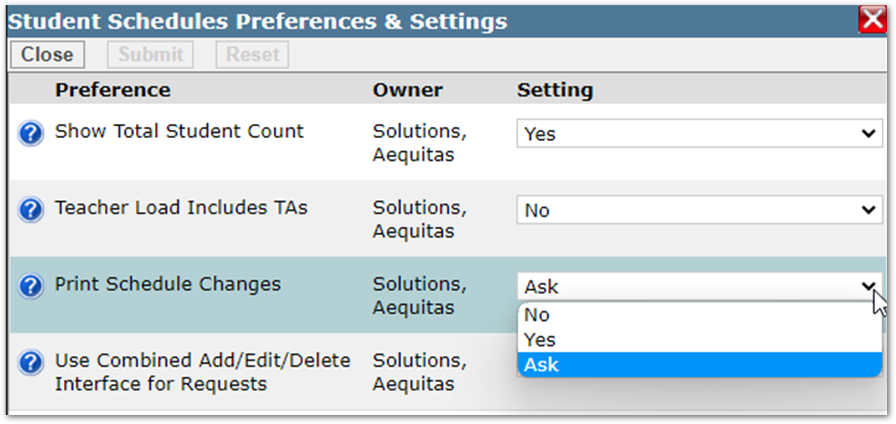
The three options are:
- Yes: Always prints the students schedule when a change is made.
- No: Does not print the student’s schedule when a change is made.
- Ask: shows a pop up when a change is made to a student's schedule asking if you would like to print the schedule.
Since the Yes and No preferences are pretty self-explanatory. Let’s see what it looks like when we set the preference to Ask.
In this scenario we have a student that is looking to drop a computer class. When we press the Save All Changes button, we are prompted with a dialog box asking if we would like to print the changes to the schedule.
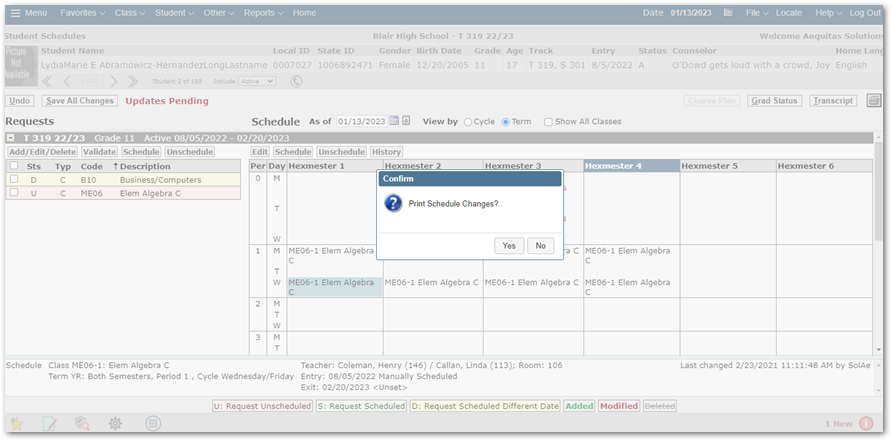 Clicking No will clear the dialog box. Clicking Yes will generate a report with the student s schedule changes.