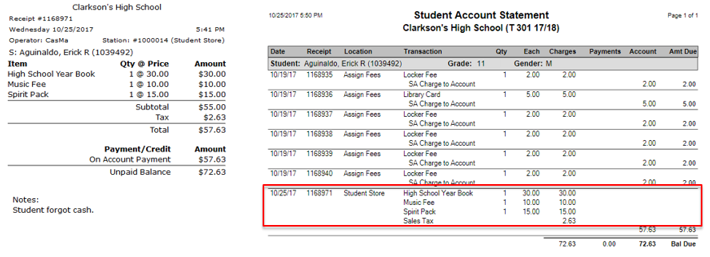
SBA Transactions is a point-of-sale (POS) application used to record student transactions, including purchases, payments, and charges to accounts. Payments can be made to student Food Services Accounts when the Q Food Service suite is in use. Transactions can be processed for all students regardless of current enrollment status or school of enrollment.
The successful use of Student Body Accounting applications depends on the complete setup of Accounts, Items, Cash Drawers, POS Sites and Fees in the Student Body Accounting Setup application. Please refer to the documentation for assistance.
SBA Transactions is located under the SBA menu in Q.
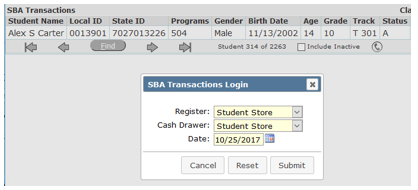
After finding and selecting a student, login to the desired Register (POS Site), Cash Drawer and select the transaction date (defaulted to the system date) and click Submit.
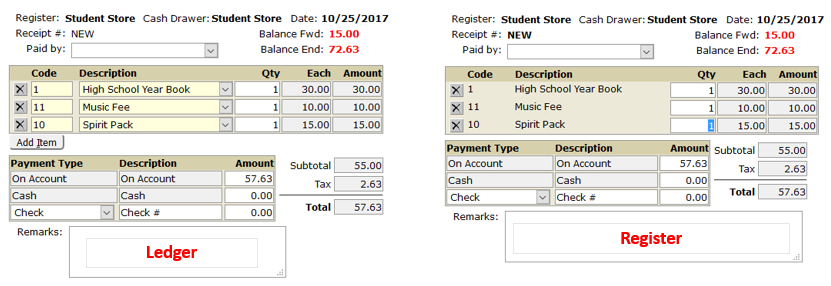
How the Register is configured in SBA Setup will determine whether the Register or Ledger screen loads.
Anatomy of the Ledger
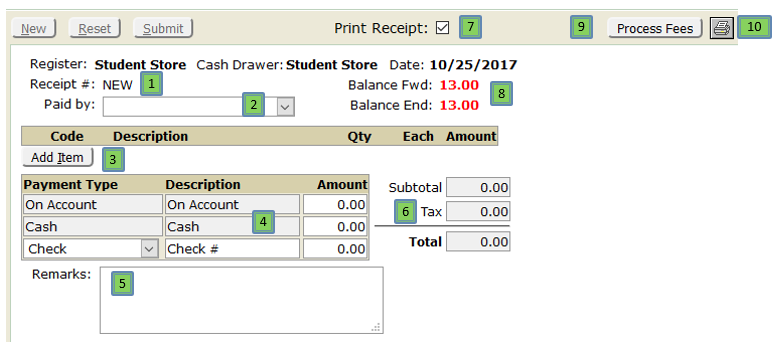
- Receipt # starts as NEW and then increments to the next number available upon submission.
- Paid by is optional and is a drop-down list from the Contact Relationship Lookup Codes.
- Add Item allows a ledger entry of an item from SBA Items.
- Payment Type will default to that set in Preferences | SBA Transactions and amounts will increase as items are added.
- Remarks are notes for the whole transaction.
- Total tracks the amount of the current transaction.
- Print Receipt checkbox determines whether or not a receipt prints automatically when Submit it clicked.
- Balance Fwd is the customer’s account balance going into the transaction and Balance End is the balance after the transaction.
- Process Fees will process all the fees for which this student qualifies.
- Print icon prints the student’s current Account Statement.
Anatomy of the Register
The items on the screen are all the same except that SBA Items are added to the transaction by clicking on the Register buttons.
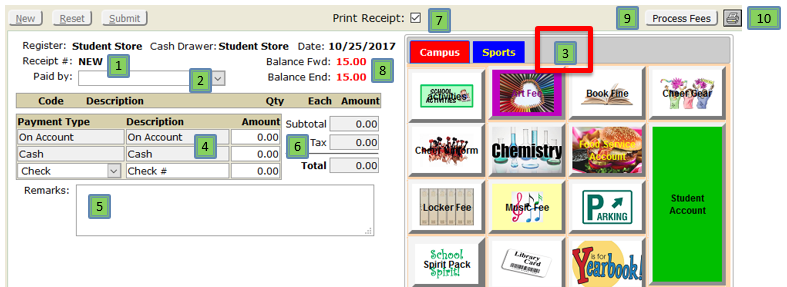
The transaction parts of the screens are essentially identical when recording the items.