Q Point-of-Sale Rosters combine students, staff or patrons, student eligibility, barcodes and account balances with user-defined formats and optional free/reduced/paid status aliases.
While details specific to this report will follow, users can find general information about reports within the Reports documentation.
PoS Rosters Report is located within Reports in the Food Service PoS menu in Q.
The Report Options allow the user to filter for the data needed by:
- Report – select Students, includes Placed, Staff, Patrons or Breakfast Students, choosing between 5 or 10-day Registers or Barcodes.
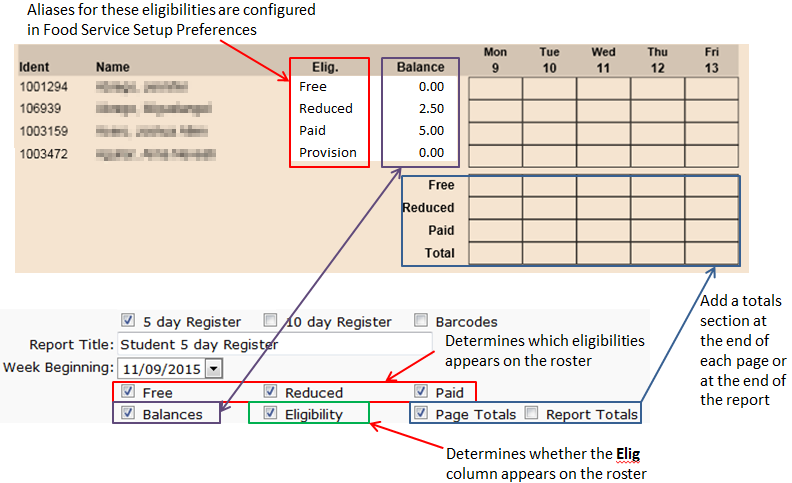
- Balances - check to include consumer account balances as of the beginning of the week.
- Eligibility – when the Eligibility box is checked, filter can be further defined by checking Free, Reduce, and/or Paid.
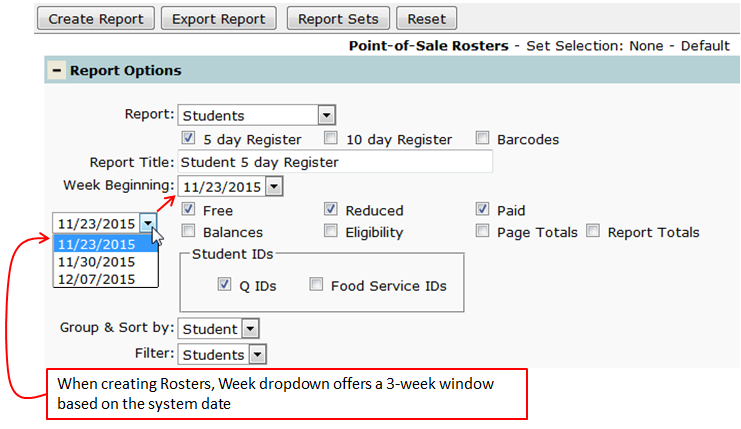
Shown below are the details of the filters available through the use of the dropdown menus and checkboxes.
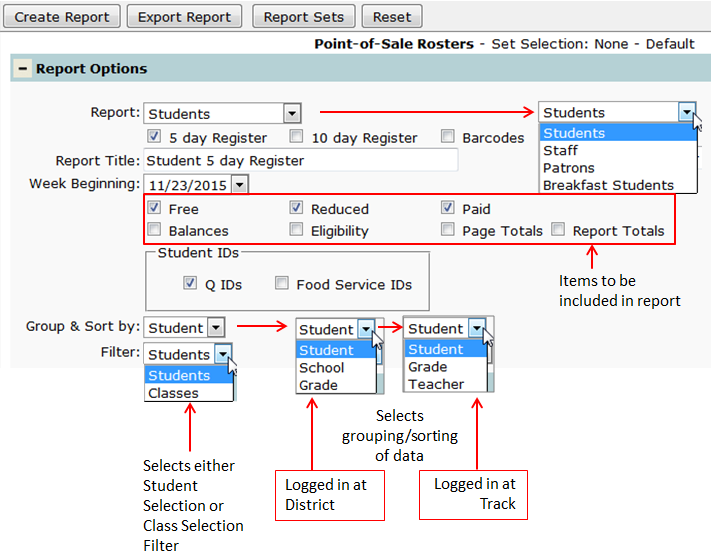
Using the Student/Classes filter changes the Selection choices and allows the user to filter based on either Class or Student data.
- Breakfast Students
The report 'Breakfast Students' filters to include students who were served breakfast within a defined number of days (default value is within the last 30 days).

Shown below is how the Report Options display on the report.
- Student Barcodes