
The Q System Editor application allows Q to be placed into Maintenance Mode, which prevents users from logging in.
Note:If the system is in Maintenance Mode and no one can access Q System Editor, then an administrator can login through the defaultAdmin.aspx page.
Q System Editor is located under the System menu in Q.
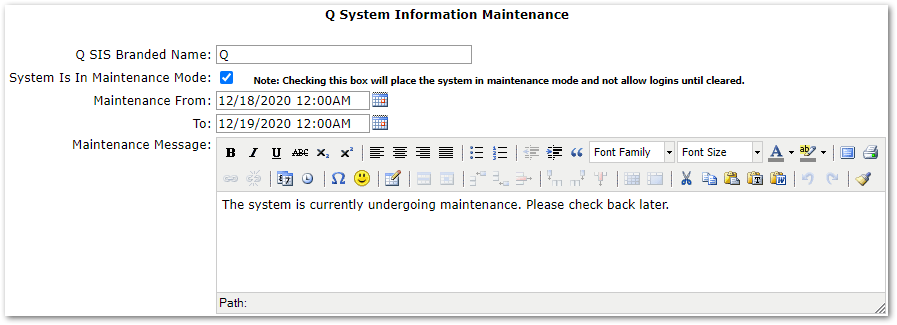 Q SIS Branded Name – This field may be used by the API when sending data to 3rd parties.
System Is In Maintenance Mode – Check this box and press Submit to place the system in Maintenance Mode. This will prevent logins in all Q apps including ParentConnection, StudentConnection, Pre-Enrollment, Student Scan, and Food Service. To take the system out of Maintenance Mode uncheck this box and click Submit.
Maintenance From/To – Selecting dates and times for these fields will display the estimated down time on the login screen when in Maintenance Mode. This will not put the system in/out of Maintenance Mode. The system does not automatially exit Maintenance Mode.
Maintenance Message – Set the message to display on the login screen when the system is in Maintenance Mode.
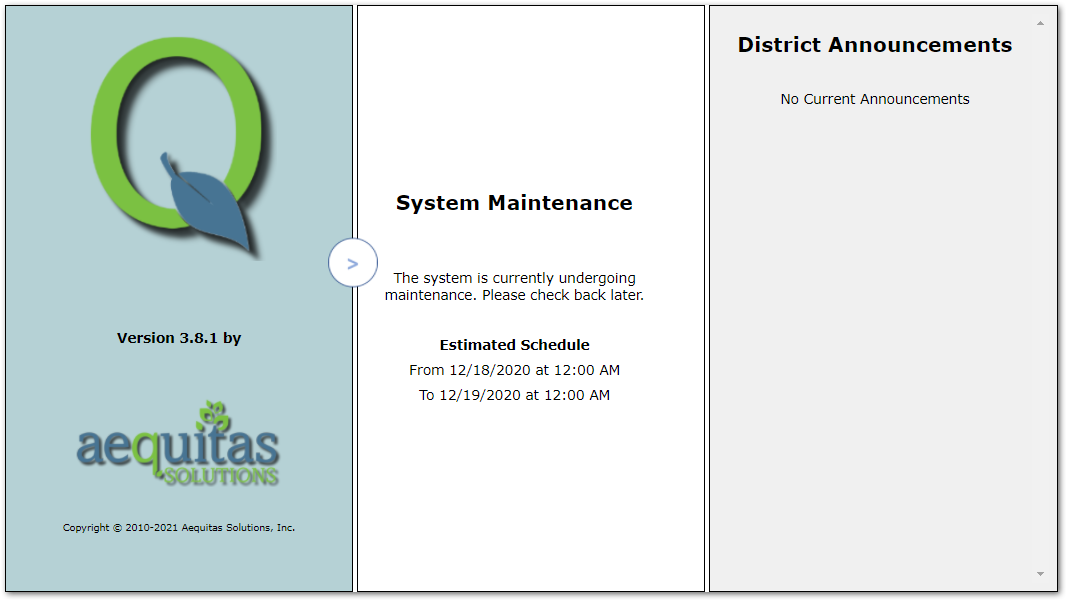 The Q login screen when the system is in Maintenance Mode.
If the system is in Maintenance Mode and no one can access Q System Editor, then an administrator can login through the defaultAdmin.aspx page.
